SOURCE-CHECKED · EVERYDAY TECH
Keep a Windows reference window visible with PowerToys Always On Top
Pin a small reference window above your work, confirm which window was pinned, and separate shortcut trouble from topmost-window conflicts.
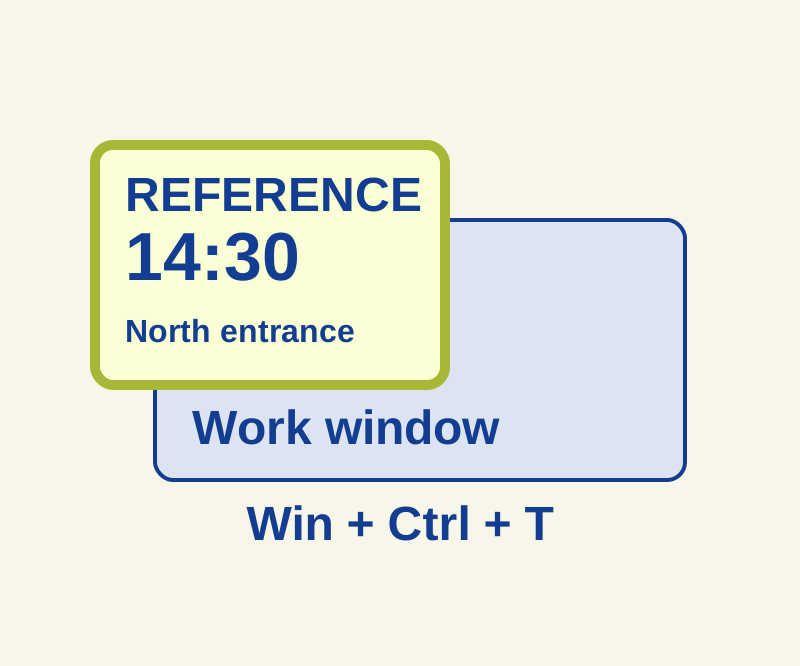
PowerToys Always On Top lets you pin a reference window so it stays visible while you work in another window. The default shortcut is Win+Ctrl+T. Pinning controls which window stays in view; you still need to click the document where you want to type. Microsoft explains how Always On Top works.
Set up the shortcut
If you need PowerToys, use Microsoft’s installation instructions. PowerToys must be running, and Always On Top must be enabled. Check the shortcut shown in its settings if Win+Ctrl+T does not respond.
The pin border and sound are configurable.
Try it with a small reference note
-
In Notepad, write this invented pickup note on three lines:
Tuesday
14:30
North entrance -
Make the Notepad window small enough to leave room for your work, then open a second blank document.
-
Click the note so it is the active window, and press Win+Ctrl+T. Click the blank document and transcribe the note there. Based on the documented behavior, the note should remain visible while your typing goes into the blank document.
-
To unpin it, click the note again and press the shortcut again. Move the work window over the note to check that it no longer stays above it. Closing the note also ends the pin.
The shortcut keeps a window above ordinary windows; it does not tile windows or reserve space for your document. If you want windows arranged side by side, see Windows Snap layouts.
If the window will not stay visible
If the note never stays above an ordinary app, check that PowerToys is running, Always On Top is enabled, the shortcut is current, and the note has focus when you press it. Check Excluded apps and the Game Mode exclusion, which can prevent activation. Exclusions match partial app names: Notepad can match both Notepad.exe and Notepad++.exe, while Notepad.exe is narrower. An absent border alone does not prove the pin failed, because the border can be disabled.
If the pin works over an ordinary app but the window disappears behind Citrix, RDP, or VMware, the issue may be another topmost window. Always On Top does not guarantee precedence over those windows. Microsoft documents these limits.
Source note: Microsoft’s documentation was checked October 10, 2026. The Windows feature and practice sequence were not independently tested.
KEEP GOING
More to explore.
SOURCE-CHECKEDApps & the web
Freeze Google Sheets headers without losing the row labels
Use a 45-item inventory to choose the correct freeze and sorting boundaries, with separate settings for repeating headings in print.
TESTEDEveryday tech
Open an RTF file after WordPad disappears, and keep its formatting
A small book club RTF, its converted DOCX and a PDF reference show what to preserve when opening an old rich-text document.