SOURCE-CHECKED · SHARING WORKFLOWS
Read a Slack Free export and find the messages and files you need
Read Slack Free JSON exports locally, find edited decisions, separate file references from originals, and understand retention gaps with a downloadable inspector.
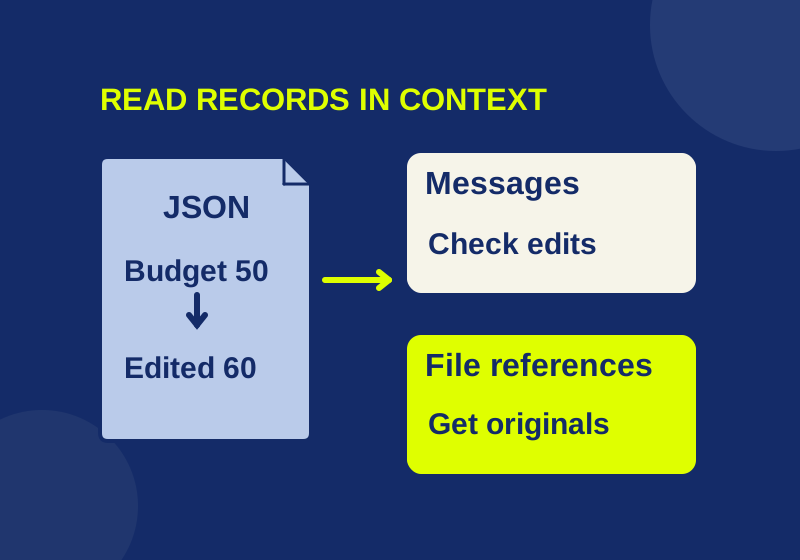
A Slack Free export stores public-channel message records in JSON files. You can open its dated channel files to trace a decision, or use an offline script to search their message text and list file references. Its file references point to originals that you must obtain separately.
Get the public-channel export
A Workspace Owner or Admin can request an ordinary Free export on desktop through Admin > Workspace settings > Security > Import/Export data > Export. They choose a date range and receive an email with a download link. This export covers public channels. It is not an ordinary backup of private channels or direct messages. If you are not an owner or admin, ask one for the public-channel export and the date range you need. Slack: Export your workspace data
Free exports do not include data older than one year. Workspace retention can be set to 90 days or one year, and Slack permanently deletes retained data daily, including pinned or saved messages when their retention period ends. An upgrade does not restore data that was already deleted. Those limits matter before you interpret an unsuccessful search. Slack: Guide to import and export tools · Slack: Customize data retention
Find a message in the JSON
Extract the ZIP first. channels.json lists channels, users.json helps identify users, and each channel’s folder contains dated JSON files. Open the files for the likely channel and dates, then inspect the text, ts, and subtype fields of a relevant record. If the sender appears as a user ID, find that exact ID in users.json before assigning a name. A missing channel folder may mean there were no records for that channel in the selected export range; its absence alone does not establish what happened outside that range. Canvases are listed separately in canvases.json. Slack: How to read Slack data exports
For a text search across the dated public-channel files, the supplied offline inspection script runs with Python 3’s standard library. From the directory containing the script, extract your export into a folder such as slack-export, then run:
python inspect-export.py slack "slack-export" "slack-report" "approved"
On Windows, use py -3 in place of python if that launcher is available. Substitute your actual input and output paths. The output folder must be new and separate from the extracted input; the script refuses an existing output folder or one inside the input. It does not access a Slack account, use the network, or fetch URLs.
The script writes messages.csv for raw message records, summary.json for counts and timestamp information, and file-references.csv for file-link occurrences. Its search is a Unicode case-insensitive substring match against text and previous_text. It does not search blocks, attachments, or canvases. If a term appears only in one of those places, a blank result is not evidence that the item is absent from the export. The script handles this dated public-channel JSON layout. Enterprise exports, TXT exports, private conversations, and DMs are outside this workflow.
Read the script usage and limits before using it with real data. Keep the export and reports in an authorized local location. Message text and file URLs in the CSVs can still be sensitive; an online JSON viewer is unnecessary for this workflow.
In messages.csv, filter query_match to true to view matching records, then open the source JSON named in the source column for surrounding context. A result may match previous_text even when the current text uses another word. To search a second term, run the command with that term and a new report folder, such as slack-report-release. Keep the original export range beside the output so a later reader can distinguish the requested period from the records the script found.
Check edits before citing a decision
A match in messages.csv is a record, not necessarily the final wording of a message. Read its channel, source file, timestamp, text, and subtype. For an edit, compare the current text with previous_text and use original_ts to relate the change to the original message when that field is available. A deletion record also needs its subtype read in context. The script lists records; it does not replay an event log to reconstruct final messages or rebuild threads. thread_ts can help you locate a reply’s parent.
The supplied synthetic ZIP and sample report contain the actual demonstration input and output. In the recorded run, a search for approved matched two records: one referred to a budget of 50, followed by an edit referring to 60. The six raw records also included one deletion and one thread reply. Reporting “six current messages” or quoting 50 without checking the edit would misstate what the records show. A bot or system record likewise needs context before it is treated as a person’s decision.
The report retains raw Slack timestamp strings, including their precision, and supplies UTC interpretations for valid timestamps. One timestamp in the synthetic fixture was invalid: the record remained in the output and the anomaly was flagged. The summary’s first and last valid UTC times describe observed records, not the date range selected for the export or proof that every expected day is present.
Follow a file reference to the file
file-references.csv lists each occurrence with its file ID, name, permalink, private URL fields, and a reference-only-not-downloaded status. In the synthetic run, two occurrences had the same F_SYNTHETIC ID. That is two references to one unique ID, not proof of two separate files.
A Free export contains file links rather than file binaries, and its exported file links are limited to the last 90 days. Save a needed original separately through an authorized account and open that saved copy. Keep the original filename and version meaningful to the project. A budget.csv from an earlier discussion can share a name with a revised budget.csv; compare its content with the decision you found before sending it onward. If a Slack reference to a Drive or Dropbox file has been deleted, the original may still exist at that service. Slack: Export your workspace data · Slack: Guide to import and export tools · Slack: Customize data retention
If the script stops on malformed JSON or cannot read channels.json, treat that run as incomplete. Check the extracted input, correct the problem, and use a fresh output folder. The script preserves the input.
If you need a private conversation, the ordinary public-channel ZIP cannot supply it. Slack describes a separate Workspace Owner application under limited legal or consent conditions in its export-tool guide. That application is outside the ordinary Free export described here. Obtain the appropriate organization permission before distributing any conversation archive.
Source scope: Slack’s linked help pages checked October 7, 2026, and a recorded run using a handmade synthetic fixture. The fixture is not a Slack export; no actual workspace export or recipient download was tested.
KEEP GOING
More to explore.
SOURCE-CHECKEDWeb research
Build Zotero saved searches that find the research you need
A populated query worksheet shows how collection and tag searches combine, which records qualify, and why results change.
SOURCE-CHECKEDEveryday tech
Chrome Task Manager: find the tab slowing your browser
Match a task to its tab, understand what the memory reading measures, and stop only the work you intend to discard.