SOURCE-CHECKED · WEB RESEARCH
Build Zotero saved searches that find the research you need
Combine Zotero saved searches with AND and OR, follow an eight-record example, and diagnose results that are too broad.
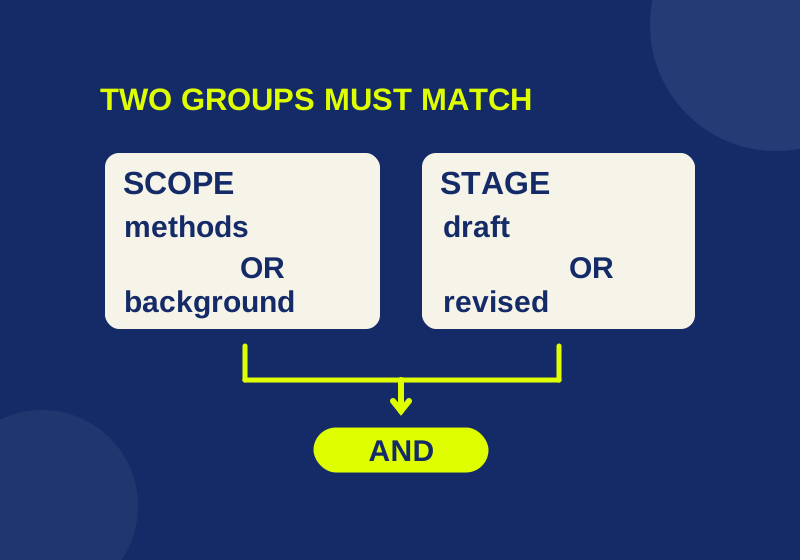
To find Zotero sources that belong to either a methods or background collection and carry either a draft or revised tag, save each pair of alternatives as a search. Combine those searches with Match all. You can then return to the same research question as your records change, without rebuilding its conditions.
The useful question in this example is: “Which sources in these two parts of my project are still in progress?” A second search answers “Which methods sources need checking?” Although some records qualify for both, the questions need different criteria.
Start with a question you can check
A query called “Useful sources” leaves you guessing what belongs in it. A name such as “Project work in progress” gives you a question to compare with its conditions. Before adding filters, write the question in one sentence and identify a record that should qualify and another that should stay out.
For the first question, a source must satisfy two requirements: it belongs to the methods or background part of the project, and its stage is draft or revised. Either collection is acceptable. Either stage is acceptable. A record still needs one value from each group.
In compact form, the question is:
(methods OR background) AND (draft OR revised)The parentheses matter. Combining all four criteria with Match any would also admit a revised source outside the project. Combining them all with Match all would demand both collection memberships and both stage tags, a different question.
Use an eight-record worksheet
Download the query practice CSV. It lists eight real Zotero documentation pages with proposed collection, stage and action assignments. Those assignments are a practice scenario; they do not describe the editorial status of the documentation.
| Row | Source | Collection | Stage | Action |
|---|---|---|---|---|
| R1 | Searching | methods | draft | ready |
| R2 | Collections and Tags | methods | revised | needs-check |
| R3 | Related Items | background | draft | ready |
| R4 | Duplicate Detection | methods | final | ready |
| R5 | Notes | background | revised | ready |
| R6 | Creating Bibliographies | methods | draft | needs-check |
| R7 | Adding Items to Zotero | intake | final | ready |
| R8 | Zotero Groups | intake | revised | needs-check |
The CSV is a planning worksheet you can open in a spreadsheet. It is not a Zotero import file or a library export. R1 through R8 are exercise identifiers.
To use the recipe, give the records these custom tags: stage:draft, stage:revised or stage:final, and action:ready or action:needs-check. The worksheet’s shorter labels map to those full tag names. Use the exact collection names methods, background and intake when reproducing the example, or substitute your own names throughout.
Stage records where the source stands in your project. Action records what you still need to do with it. A final source can need another check, so keep those two questions separate when choosing criteria.
Save the alternatives, then combine them
In Advanced Search, select the library containing your records. Create and save these three searches:
| Saved search name | Match setting | Conditions |
|---|---|---|
| Project scope | any | Collection is methods; Collection is background |
| Work in progress | any | Tag is stage:draft; Tag is stage:revised |
| Project work in progress | all | Collection is Project scope; Collection is Work in progress |
Zotero documents this method of combining saved searches in its searching guide. A saved search keeps criteria and updates matching results; it does not store a fixed result list.
The worksheet predicts five matching parent records: R1, R2, R3, R5 and R6. R1 and R6 have the methods/draft combination; R2 has methods/revised. R3 has background/draft, and R5 has background/revised.
The excluded records are useful checks:
- R4 belongs to methods, but its stage is final.
- R7 belongs to intake and is final.
- R8 is revised, but it belongs to intake.
R8 catches a common mistake in the final search. It passes Work in progress but fails Project scope. If the final search accepts either branch, R8 gets through. Requiring both branches preserves the question you started with.
These are logical predictions for the worksheet, not results observed in a live Zotero library.
Give follow-up work its own search
For “Which methods sources need checking?”, save a search named Methods follow-up with Match all:
Collection is methods
Tag is action:needs-check
R2 and R6 satisfy both conditions. R4 is a methods source, but its action is ready. R8 needs checking, but is outside methods.
Changing this search to Match any predicts five matches: R1, R2, R4, R6 and R8. That setting answers “Which sources are in methods or need checking?” The extra records follow directly from that broader question. R8 is the easiest clue because it passes only the action condition.
When adapting the recipe, choose an equally clear negative example from your own library. A source that shares the action tag but belongs to another project gives you a quick way to catch an accidental OR.
See what a changed record should do
Suppose R2 moves from revised to final. Replace stage:revised with stage:final if your stage values are exclusive. The project work-in-progress search should lose R2, leaving four worksheet records. Methods follow-up should retain it because action:needs-check still applies.
That difference is useful while finishing a draft. Completing the writing stage does not have to erase a pending source check. Removing the action tag later would answer the second question separately.
Now suppose R8 is also added to methods. Its revised stage qualifies it for Project work in progress, and its needs-check action qualifies it for Methods follow-up. Zotero supports multiple collection placements for one record, as its collections guide explains. Keeping the original intake placement does not prevent the additional methods membership from satisfying these queries.
Diagnose the condition that changed the answer
When a known record is missing, inspect each branch separately. If it appears in Work in progress but not Project scope, examine its collection placement. If it appears in Project scope alone, examine its stage tag. If both branches contain it but the final search does not, inspect the final search’s saved-search conditions and selected library.
Zotero provides Edit Saved Search for revising criteria. Its parent/child options, including Show only top-level items and Include parent and child items of matching items, can also change the rows displayed. The counts here concern eight parent source records. Child notes or attachments require a separate comparison.
For an unexpectedly broad result, start with the all/any setting at the level where the extra record enters. Preserve the question and its criteria recipe in your worksheet so that an edit made months later has a clear reference.
Source note: menu instructions were checked against official Zotero documentation on October 7, 2026. The collection and tag assignments are illustrative; no live Zotero profile was tested.
KEEP GOING
More to explore.
SOURCE-CHECKEDWeb research
How to build a Zotero reading queue you can actually finish
A practical reading queue with clear completion rules, separate revisit tasks, and a downloadable example worksheet.
SOURCE-CHECKEDWeb research
How to write Zotero research notes you can use in a draft
Keep source claims, your interpretation and open questions separate with completed notes you can use while writing.