SOURCE-CHECKED · WEB RESEARCH
Use Zotero Related Items to connect different source versions
Link distinct Zotero records with a six-source example, preserve the reason in a note, and avoid mistaking newer versions for duplicates.
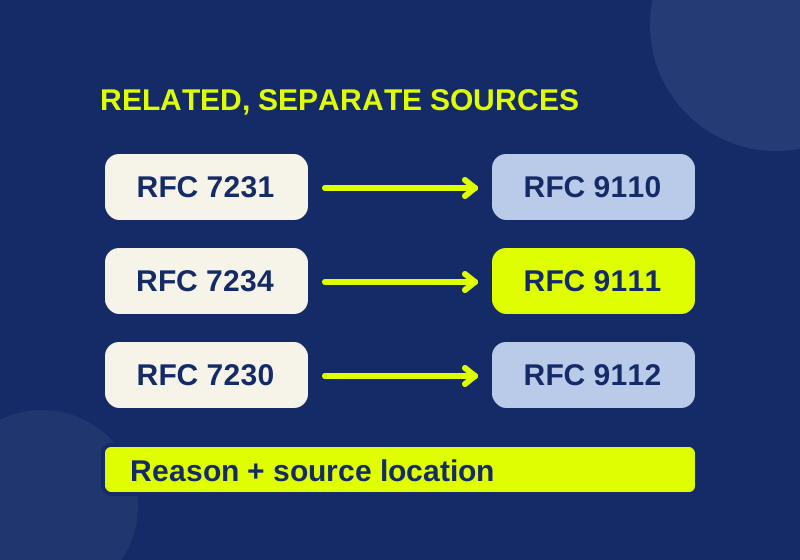
Zotero’s Related Items can connect an older source to a later publication while keeping both bibliographic records separate. Select a record, open Related and add its counterpart from the same library. Add a note explaining the connection so that you can retrieve the right version later.
That explanation matters when several documents share nearly identical titles. “Related to” can mean a review, a later version, or a source discussed in another paper. A short note can preserve the specific reason you connected them.
Start with six identifiable sources
The following research example uses real HTTP specifications. You do not need to understand their technical contents to practice finding an older source’s counterpart. Their RFC numbers give each record an identifier you can compare before creating a link.
| Earlier source | Later source | Relationship supported by the source |
|---|---|---|
| RFC 7231 | RFC 9110 | RFC 7231’s information page identifies RFC 9110 as its successor. |
| RFC 7234 | RFC 9111 | RFC 9111 obsoletes RFC 7234. |
| RFC 7230 | RFC 9112 | RFC 9112 replaces the messaging and connection management portions of RFC 7230; RFC 9110 replaces other parts. |
The older titles share “Hypertext Transfer Protocol (HTTP/1.1)” and distinguish Semantics and Content, Caching, and Message Syntax and Routing, respectively. The corresponding later titles are HTTP Semantics, HTTP Caching, and HTTP/1.1. A search for “HTTP” alone could leave you choosing among very similar records; inspect the RFC number and source URL.
Download the six-record source map for the full titles and links. The three-pair relation sheet supplies a starting plan for the connections and their reasons.
Both downloads are original planning worksheets you can open in a spreadsheet. They are not Zotero exports or native import files. Save the source records separately, or use records already in your library. The six-document set illustrates version tracing; it is not a complete map of current HTTP standards.
Add direct counterparts
Check that the records are in the same library. Select RFC 7231, open Related, choose Add, select RFC 9110 and confirm with OK. Repeat for RFC 7234 with RFC 9111, and RFC 7230 with RFC 9112.
Zotero documents an automatic reverse relation and navigation by clicking a related item. It also limits relations to one library. These steps follow the official Related Items instructions.
After creating those three pairs, the expected direct neighbors are:
| Record | Expected related record |
|---|---|
| RFC 7231 | RFC 9110 |
| RFC 9110 | RFC 7231 |
| RFC 7234 | RFC 9111 |
| RFC 9111 | RFC 7234 |
| RFC 7230 | RFC 9112 |
| RFC 9112 | RFC 7230 |
There are three chosen connections, even though each appears from both ends. The table predicts what the documented feature should show for this plan; it is not a report from a live Zotero trial.
When following a counterpart, inspect its identifier after navigation. Arriving at another HTTP record is insufficient if you meant to compare RFC 7234 specifically with RFC 9111. The recorded pair gives you a precise destination.
Keep the source’s direction in a note
A reciprocal link makes navigation convenient. Your research explanation still needs to say which source replaced another and where that claim appears.
For RFC 9111, add a child note through the record’s Notes section. Zotero describes child notes and their searchability in its notes documentation. A filled annotation for this pair could read:
Relation reason: RFC 9111 obsoletes RFC 7234.
Evidence location: RFC 9111 Abstract, final paragraph.
Evidence URL: https://www.rfc-editor.org/info/rfc9111/
Use when: comparing a historical cache requirement with the later specification.
Retrieval phrase: cache-version-pair
The first line records a source-supported relationship. The location gives you a place to reopen when checking it. The use line is a suggested research purpose, not a claim that the two documents contain identical requirements.
Keep your own findings separate from that source fact. If you later compare a particular passage, add the exact location in each document and explain what you found. The annotation above has no such finding yet. It supports retrieving the pair without pretending the comparison has already been completed.
This approach also avoids relying on the Related list to describe direction. Reading the connection from RFC 7234 should not lead you to interpret the older document as the replacement for RFC 9111.
Handle a replacement that splits across documents
RFC 7230 provides a more complicated case. The RFC 9112 introduction states that it replaces the messaging and connection management portions, while HTTP Semantics replaces other parts.
A useful annotation on the RFC 7230 record would therefore say:
Relation reason: RFC 9112 replaces messaging and connection management portions.
Other counterpart: RFC 9110 covers the other replaced portions.
Evidence location: RFC 9112 Introduction.
Evidence URL: https://www.rfc-editor.org/info/rfc9112/
Question when using this source: Which portion does the cited passage concern?
After checking that explanation, you can add a direct RFC 7230 to RFC 9110 link. RFC 9110 is already one of the six records, so this adds a fourth connection to the plan without requiring a seventh source.
RFC 7230 would then have two counterparts: RFC 9112 and RFC 9110. RFC 9110 would link to RFC 7231 and RFC 7230. Zotero’s documented relations are nontransitive: those links do not automatically establish a direct connection between RFC 7231 and RFC 7230.
This is why a single label such as “new version” can lose useful information. For this source, the note should identify the portion you need. The RFC 9112 information page also lists a later update, RFC 9931; consult the current source information page when extending the research beyond this six-record example.
Retrieve the explanation while writing
Suppose a draft already cites RFC 7234. Open that original record and follow its RFC 9111 counterpart when you need to inspect the later specification. Keep track of which text supports the sentence in your draft. Adding a relationship does not establish that the older wording and later wording are interchangeable.
To find the filled caching annotation again, search for cache-version-pair using All Fields & Tags. Zotero’s searching documentation says this mode includes notes. A search restricted to Title, Year, Creator will miss text that exists only inside a note.
For a larger project, use collections or tags to gather a topic and reserve these direct links for counterparts you expect to revisit. Connecting every HTTP source to every other source would make this particular retrieval task harder: the source numbers and reason notes would still be needed to identify the intended pair.
Resolve a missing or ambiguous target
If the target is absent from the Add dialog, check its library and exact identifier. A record in a group library cannot be related directly to one in My Library. Use the existing same-library records when they are available; this procedure does not require reorganizing someone else’s library.
If two records have similar titles, compare their source identifiers before deciding whether they should remain separate. These differently numbered RFCs represent distinct documents. Zotero’s duplicate documentation describes merging duplicate records and retaining their collections and tags; merging these different specifications would discard the distinction the source map is meant to preserve.
Source note: the procedure is based on Zotero documentation, and the linked RFC source headers were checked October 7, 2026. The downloads are planning material. No live Zotero profile was tested.
KEEP GOING
More to explore.
SOURCE-CHECKEDWeb research
Fix Zotero Connector metadata with a real eight-author example
A real eight-author source shows how site names, revision dates and homepage links can distort a reference.
SOURCE-CHECKEDWeb research
How to check a Zotero snapshot really works offline
A saved page needs its own content check. Two downloadable memos show the difference between stored text and a live link.