SOURCE-CHECKED · EVERYDAY TECH
Notepad text encoding: save UTF-8 without keeping mangled characters
Save readable text as UTF-8 in Notepad and diagnose an encoding mismatch. Compare original UTF-8 and UTF-16 files in a local browser decoder.
If a text file shows “Café” where you expect “Café,” check how its bytes are being read before saving it again. Saving the already garbled text as UTF-8 can preserve the wrong characters.
Save a readable copy as UTF-8
Open a copy of the file in Notepad and check a word containing an accent or another non-ASCII character. If it reads correctly, use File > Save As. If your installed Notepad shows an Encoding selector, choose UTF-8 and save under a new filename. Then open that new file in the program where you need to use it. The opening and Save As steps follow Microsoft’s Notepad help.
If the text already looks wrong in Notepad, pause before saving. You need to read the original bytes with the right encoding first. A new UTF-8 file made from “Café” will still say “Café.”
Why the same file can look different
Unicode defines the characters; UTF-8 and UTF-16 are different ways to encode them as bytes. Microsoft’s Unicode overview explains that distinction.
In the original sample file, an unmarked UTF-8 file began with 43 61 66 C3 A9. A strict UTF-8 decoder read its first word as “Café.” Reading those same bytes as Windows-1252 produced “Café.” Windows-1252 is one Western European legacy code page, so that result does not identify the encoding of every file labeled “ANSI.”
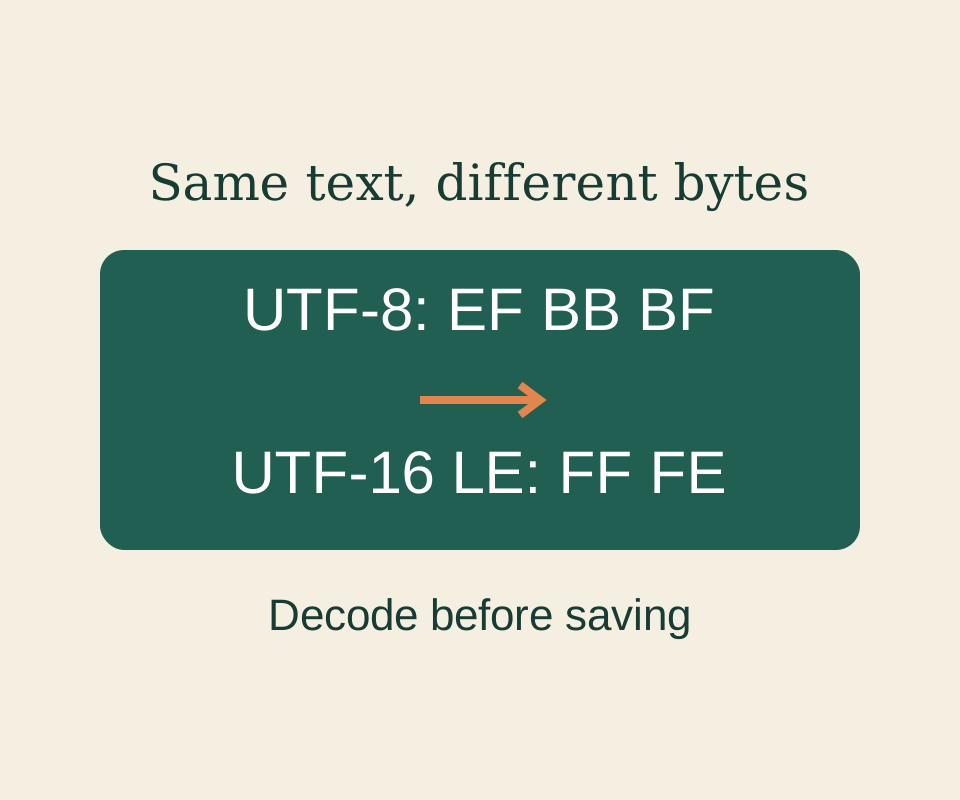
A byte order mark, or BOM, can provide a clue. The test used three files containing the same text and line endings: a 39-byte UTF-8 file without a BOM, a 42-byte UTF-8 file beginning EF BB BF, and a 66-byte UTF-16 little-endian file beginning FF FE. Strict decoding with the matching encoding read “Café costs €5.” and “Next stop: 東京.” correctly. The BOM is a byte marker, separate from those text characters. A file containing only ASCII characters may offer no such clue: its bytes can be compatible with UTF-8 and a legacy encoding.
You can inspect a local copy in the text encoding lab. It shows the first eight bytes and any BOM clue, then lets you compare strict UTF-8, UTF-16 little-endian, and Windows-1252 decoding. It does not upload, repair, or write the source file. If letters have already been replaced by question marks or lost, those missing characters cannot always be reconstructed; return to an original copy if you have one.
Notepad’s UTF-8 default for new files was announced in a 2018 Windows Insider build. That historical change does not mean an existing file was converted when you opened it.
Source note: The Notepad workflow is based on Microsoft documentation; its current interface was not tested. The byte and decoder results above come from the recorded October 9, 2026 fixtures, separate from any Notepad test.
KEEP GOING
More to explore.
TESTEDEveryday tech
Open an RTF file after WordPad disappears, and keep its formatting
A small book club RTF, its converted DOCX and a PDF reference show what to preserve when opening an old rich-text document.
SOURCE-CHECKEDEveryday tech
Windows invalid file name: fix the name before changing your PC
Identify reserved characters, device names and trailing punctuation in a Windows filename while separating whole-path length problems.