SOURCE-CHECKED · EVERYDAY TECH
Save iPhone Shared Album photos before the album is deleted
How participants can keep selected Shared Album items in their own Photos libraries, with iOS 26 and iOS 27 invitation controls.
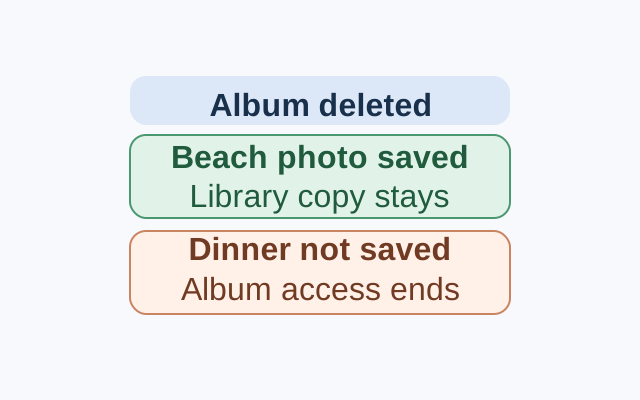
Open each photo or video you want to keep in the Shared Album. Tap Share, then Save Image or Save Video. Check that the item appears in your own Photos library before telling the album owner you’re ready for deletion. An invitation or album link gives you access; saving the item puts a copy in your library.
Suppose an album has a beach photo and a dinner photo, and you save only the beach photo. Apple’s guidance says the saved photo stays in your library after the owner deletes the album. Your access to the unsaved dinner photo ends with the album.
If someone still needs access
On iOS 27 or later, the owner can choose invitation, approval, and link settings in Sharing Options while creating the album. For an existing album, open Manage Shared Album and tap Invite Participants. Someone with the link may need approval, depending on the owner’s settings.
On iOS 26, the owner can invite contacts or enter an email address or iMessage phone number while creating the album. For an existing album, tap More, the album name, then Add Participants. Apple also documents a Public Website option for albums created in iOS 26 or earlier. It makes their photos viewable by anyone with an up-to-date browser.
After recipients have checked the items they want in their own libraries, the owner can open the album and tap More, Delete Shared Album, then Delete. Apple says deletion removes the album from the owner’s and subscribers’ devices and permanently deletes its album contents. Items already saved or downloaded to a Photos library remain there. Content downloaded from Shared Albums in iOS 26 or earlier may lack information from the original.
Source: Apple Support, “How to use Shared Albums in Photos”, published October 6, 2026. These are Apple’s documented steps and outcomes.
KEEP GOING
More to explore.
SOURCE-CHECKEDEveryday tech
Copy iPhone photo edits to a batch without treating every shot alike
A window-lit sequence can share a starting edit; night, sunlight and stage shots need separate judgments.
SOURCE-CHECKEDEveryday tech
Copy text from an iPhone photo with Live Text, and catch the mistakes before you paste
Turn useful lines in a photo or paused tutorial into text you can edit in Notes.