SOURCE-CHECKED · BUSINESS DOCUMENTS
Asana CSV subtasks: fix duplicate parent names before import
Catch Asana CSV subtasks that match the wrong parent or appear before it with a downloadable local checker and corrected six-task examples.
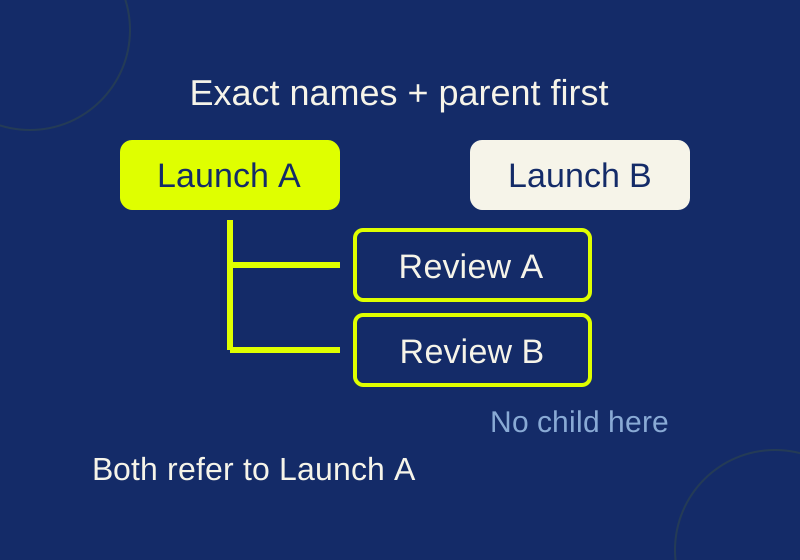
Before importing tasks into Asana, check every Parent Task value against the Name rows above it. Asana’s advanced CSV import guidance says the parent name must match exactly and the parent must appear before its child. If that name appears more than once, the child matches the closest row above it with that name.
Row order can produce the wrong relationship: a child can have a valid parent name and still attach to the wrong task. A local check can flag that risk while the CSV is still easy to edit.
Check names and row order together
A Parent Task value is a name reference, not an instruction to find the parent whose description sounds most relevant. Suppose a CSV contains two tasks named Launch. A later child with Launch in its Parent Task column points to the second Launch, even if its description says it belongs to the first.
Check the actual headers before editing. The practice files in this article use Name, Description, Section, Assignee, and Parent Task, with Name first and blank assignees. Those are practice files; do not assume an existing export already contains a Parent Task column. If you need to prepare an import, preserve the raw export and make a working copy where each intended parent relationship is explicit. Asana’s CSV preparation guidance covers field preparation and says an assignee must be a valid Asana user.
The repeated-parent trap
The downloadable example contains this six-task CSV. Row numbers count CSV records, with the header as row 1. They are not necessarily physical text lines in a CSV that contains multiline fields.
| Row | Name | Parent Task | Intended relationship |
|---|---|---|---|
| 2 | Launch | (none) | First parent |
| 3 | Review | Launch | Child of row 2 |
| 4 | Launch | (none) | Second parent |
| 5 | Review | Launch | Intended child of row 2 |
| 6 | Late child | Future parent | Parent appears later |
| 7 | Future parent | (none) | Parent for row 6 |
Under the documented closest-above rule, row 3 links to row 2. Row 5 links to row 4, despite its stated intent to belong to the first Launch. Row 6 has no matching parent above it. Reading the descriptions may help a person investigate the intended relationship, but the name-and-order rule does not use them to choose a parent.
Repeated child names deserve a look too. Both children here are named Review. That alone does not establish an Asana import error: two children may legitimately share a name when their parent context distinguishes them. It does make a CSV harder to inspect without looking at the full row context.
Run the practice check locally
Download the practice ZIP and unzip it. It contains ambiguous-parents.csv, a corrected unique-parents.csv, and inspect-parent-order.py. From the extracted folder, run:
python inspect-parent-order.py ambiguous-parents.csv
python inspect-parent-order.py unique-parents.csv
On Windows, py -3 can replace python. The script uses standard Python 3.9 or later, requires no added packages, and reads the CSV without uploading it or writing a replacement file.
Running ambiguous-parents.csv reported six tasks, duplicate Launch names at rows 2 and 4, and duplicate Review names at rows 3 and 5. Its parent links were 3 → 2, 5 → 4, and 6 → null. It flagged row 5 as ambiguous_parent_name, with matching parent rows 2 and 4 above it, and row 6 as parent_not_above. It exited with code 1.
The script also exits with code 1 for duplicate names even when no parent link is ambiguous. That is a conservative checker policy, not a claim that Asana forbids repeated child names. Use the report to inspect those rows rather than renaming every duplicate automatically. The checker cannot infer intended parentage from a description, and it does not rename anything.
Repair the references before importing
In unique-parents.csv, the two parents are named Launch A and Launch B. Both Review A and Review B keep their intended relationship to the first launch: their Parent Task values are Launch A. The second review remains at row 5 but now resolves to row 2. Launch B has no review child in this example. Future parent moves above Late child, which continues to reference it by name.
Checking that file finds no duplicate names and no issues. Its links were 3 → 2, 5 → 2, and 7 → 6; it exited with code 0. This shows that the example satisfies the local name-and-order check. It is not a record of an Asana import.
For a real working copy, establish which parent each child actually belongs to before changing names. Stable task IDs or source URLs from your own records can help establish that intent, but the CSV parent reference described here still depends on the parent’s name and position. When you rename a parent in the working copy, update each child’s Parent Task value to the new exact name. Put the parent before its children, then review the order again. An alphabetical sort can undo that ordering.
If repeated child names are meaningful, keep them with enough surrounding context to check each relationship in Asana’s actual preview. The local warning is a prompt for review, not a reason to guess at new names.
Inspect the Asana preview and the resulting tasks
Asana’s advanced import guidance describes a preview and a Make changes option for correcting field mapping. Check that Name, Parent Task, and any other prepared columns map as intended before proceeding. A clean local checker result cannot prove the mapping selected in an account.
Imports add new tasks; they do not update existing ones, according to Asana’s CSV preparation guidance. Review a failed or uncertain attempt before importing the same rows again, since a second import can create another set of tasks.
For a migration, an authorized empty test project gives you a place to check a small parent-and-child sample, including parentage, assigned person, and any state you need to preserve. Do not assume the CSV will restore completed state, comments, or attachments without checking the actual result. Asana’s subtask guidance also says subtasks are independent: they do not inherit a parent’s project, tags, or assignee. If a subtask needs to appear in a project or calendar, check its project association separately.
Source and test scope: The Asana instructions follow the official help pages linked above, checked October 7, 2026. The downloadable CSVs and checker have a recorded local synthetic test only. No Asana export or destination import was tested.
KEEP GOING
More to explore.
SOURCE-CHECKEDBusiness documents
Check a Google Docs export in Word before sending it for review
Find missing review material with Word controls and a read-only DOCX inventory before reconciling returned edits.
SOURCE-CHECKEDBusiness documents
CSV stuck in one Google Sheets column? Fix the separator without breaking the data
Import the original with its field separator. Four downloadable sample orders show why punctuation replacement can break amounts, notes and identifiers.