TESTED · APPS & THE WEB
How to add multiple stops in Google Maps without losing the visit order
Add and reorder Google Maps stops on a computer, count the final destination correctly, and compare ready-made Washington DC route-order examples.
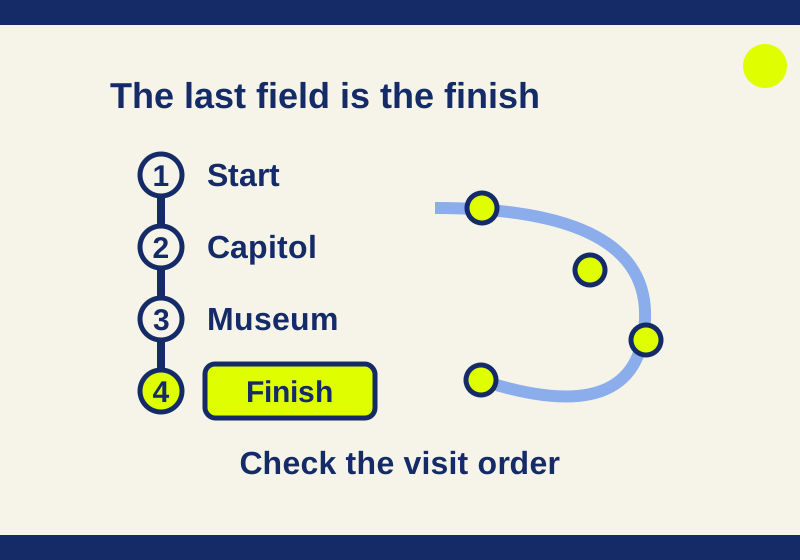
On a computer, open Google Maps Directions, enter a start and destination, choose a travel mode, and click Add destination. Read the place list afterward. Its last field is the finish, so adding another place can change where the trip ends.
The desktop limit is nine stops, including the finish and excluding the start.
Build the route before adding another place
Open Google Maps, click Directions, and enter the starting place and a destination. Choose Driving, Walking or another supported mode, then use Add destination below the destination list. Enter the next place and check that Maps resolved it to the location you meant.
Google documents reordering by dragging destination fields. Check their resulting sequence from top to bottom.
For a ready-made example, open Washington Monument to Lincoln Memorial via the United States Capitol. The October 4 check displayed those three Washington DC places in that order, with a driving route.
This is an example of how destination fields work, not a recommendation for the shortest sightseeing itinerary. It does not establish where to park, whether an entrance is open, or how long a visit takes.
What happened when a museum was added
An October 7 check opened the same three-place route. Initially, Best travel modes was selected and Add destination was not visible. Selecting Driving exposed the button. Clicking it created another destination field after the Lincoln Memorial.
The new field was filled with Smithsonian National Museum of Natural History Washington DC. After clicking its Search button, Maps accepted the museum’s address at 10th St. & Constitution Ave. NW, Washington, DC 20560. The place list then read:
- Washington Monument, the start.
- United States Capitol.
- Lincoln Memorial.
- Smithsonian National Museum of Natural History, the new finish.
The added museum had gone after the original final destination. If the aim were to visit the museum and still finish at the Lincoln Memorial, the list would need a different order: Monument, Capitol, museum, Lincoln Memorial.
That last sequence is a proposed arrangement. An attempted drag during the check left the order unchanged, so this article’s successful interface check covers adding the destination, while reordering instructions rely on Google’s documentation.
When building your own route, finish entering the places before judging the line on the map. If the last field names a place where you only wanted to stop briefly, correct the destination order before using the directions.
Compare two visit orders without rebuilding everything
These links illustrate three different sequences with the same Washington landmarks:
- Monument, then Capitol, finishing at Lincoln Memorial.
- Monument, then Lincoln Memorial, finishing at the Capitol.
- Capitol, then Monument, finishing at Lincoln Memorial.
The first link’s route display was checked. The other two use the documented URL format to express different orders; their displays were not independently tested. You can also download all three order examples as a text file.
Look at what each sequence changes. In the second, the Capitol becomes the finish. In the third, the trip starts at the Capitol. If your actual starting point is fixed, the third sequence does not answer the same planning question as the first two.
For a route with a fixed start, two intermediate places and a fixed finish, there are two intermediate orders to compare: visit the first place and then the second, or reverse them. Keep the endpoints the same when making that comparison. You still need to choose an order; these links do not ask Maps to optimize the visits automatically.
Count the final destination as a stop
The nine-stop limit is easier to apply by separating the start from everything you visit afterward. A start, eight intermediate destinations and a final destination gives you nine stops, although ten place names appear in the complete route. A start, nine intermediate destinations and a finish gives you ten stops and exceeds the desktop limit.
For a longer trip, make separate routes with a shared endpoint. For example, route one could begin at your starting place, visit eight intermediate places and finish at a hotel. Route two starts at that hotel and continues with the remaining visits. The hotel counts as the final stop in route one and as the starting point in route two.
That example describes how to divide the place list. It makes no assumption about travel times, overnight stays, hotel availability or which route is most efficient.
If Add destination is missing
Check the selected mode and stop count first. Transit and flights do not support multiple destinations in this directions flow. In the October 7 check, explicitly choosing Driving from Best travel modes made Add destination visible; that observation is one thing to try when your own intended mode is driving.
Departure or arrival time scheduling is another separate limit: Google’s computer directions guidance supports it for a route with one destination. A route with several destinations therefore cannot be treated as a single scheduled journey using that control. Planning individual legs can help outline a trip, but leaves the time spent at stops and later traffic to be accounted for separately.
Changing the roads and changing the order
Dragging a destination field changes when you visit a place. Dragging the blue driving route on the map changes the roads it follows. If you want to visit the museum before the Lincoln Memorial, the destination list needs that order; bending the blue line is a different edit.
The example links follow Google’s Maps URLs format: origin identifies the start, destination the finish, and waypoints the places between them. The format requires api=1 and does not require an API key. It is designed to open across platforms, subject to the receiving browser or app’s capabilities. Check the displayed places when opening a link; the desktop interface’s nine-stop rule is not a blanket rule for every URL or receiving device.
Source note: Official desktop and Maps URL guidance was checked October 7, 2026. The October 4 record covered the original three-place route display. The October 7 Aside check successfully added the museum as the fourth place; a drag attempt did not change the order. No physical journey, alternate link display or phone transfer was tested. Live travel times from the checks are not used here.
KEEP GOING
More to explore.
SOURCE-CHECKEDApps & the web
Find wheelchair-accessible transit options in Google Maps
Google documents a transit route option on computers and Android. Its Android guidance also explains place attributes, which are available only in certain countries.
SOURCE-CHECKEDApps & the web
Freeze Google Sheets headers without losing the row labels
Use a 45-item inventory to choose the correct freeze and sorting boundaries, with separate settings for repeating headings in print.