SOURCE-CHECKED · IMAGE WORKFLOWS
How to credit a CC BY photo on a website
Use a real CC BY 4.0 photo with a complete credit, copyable HTML caption, download and clear notices for resized or cropped images.
You can use a CC BY 4.0 photograph in a blog post that earns ad revenue. The license allows commercial use and adaptations, provided you give appropriate credit, link the license, and indicate changes. A caption below the photo can provide the source and terms in one readable place.
The photo below is Landscape view in Duhok Governorate.jpg, whose Wikimedia Commons file page identifies R3YBOl as its creator and lists the work under CC BY 4.0.

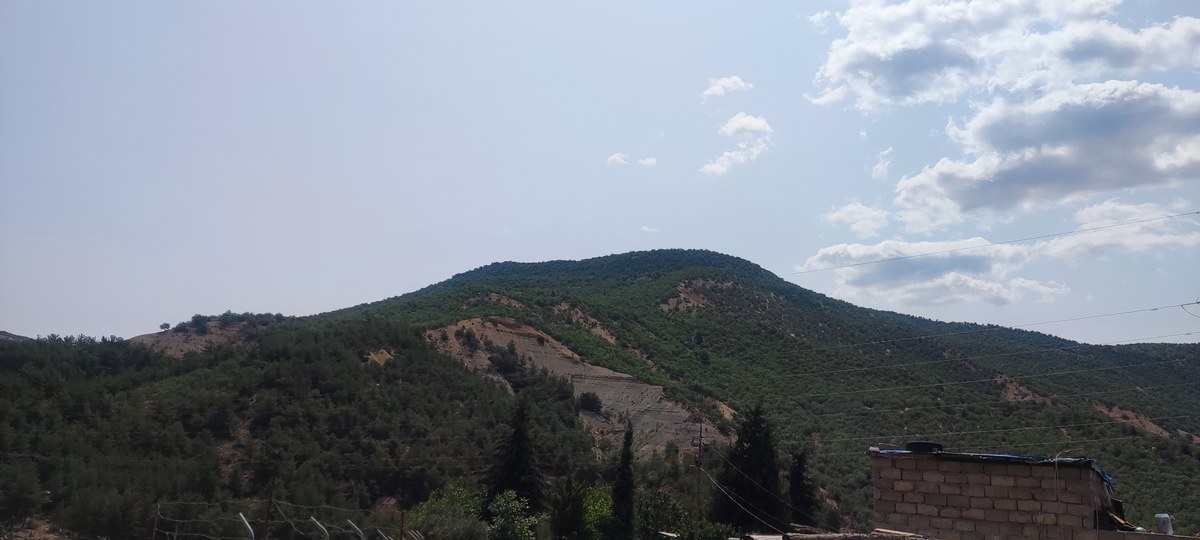
“Landscape view in Duhok Governorate.jpg” by R3YBOl, via Wikimedia Commons, licensed under CC BY 4.0. Resized from 4000 × 1800 to 1200 × 540 and JPEG recompressed; original metadata removed and credit metadata added. No crop.
The linked title takes readers to the exact work. The linked username identifies the credited creator, and the license link names the exact version that applies. The last sentence says what happened to this website’s copy. A reader can see all of that without opening the image file or looking for a separate credits page.
Start with the photo’s own page
Before downloading a photo, open its source page rather than relying on a search result or thumbnail. For this example, the file page supplies the work’s name, creator, source, and license. It describes the image as the uploader’s own work. That is the page’s statement; checking it is not an independent investigation of who took the photograph.
Record the details for this file. Even if you have used another image by R3YBOl, do not assume it has the same license. If you later replace the photo, check the replacement’s file page and update the caption. A familiar creator name or a copied caption does not establish the terms for a different image.
Creative Commons recommends a practical credit that identifies the title, author, source, and license. Under the CC BY 4.0 legal code, you must retain the supplied creator and attribution-party names, copyright notice, license notice, disclaimer notice and source link, as reasonably practicable for the medium. A title is helpful for readers, as it is here, but it is not universally mandatory under version 4.0. Keep any notices the source supplies rather than reducing every credit to a username and a license badge.
Put the credit next to the image
A visible caption directly below the photograph is a straightforward treatment for a blog post. In a CMS, place the credit in the image’s caption field if the published theme displays that field beside the image. Check the published page, since an editor’s stored caption is of little use to readers if the theme hides it. If the theme has no visible caption, put the same credit in ordinary text immediately following the image.
The image’s alternative text has a different job. “Wooded hills and a small brick building in Duhok Governorate, Iraq” describes the image; it does not tell a reader who created it or what license applies. Use descriptive alt text and keep the credit visible in the caption. A filename, embedded JPEG metadata, or a hidden CMS field is not a substitute for the credit readers need to find.
If you write the page in HTML, the same example can use a figure and figcaption:
<figure>
  <img
    src="/practice/remediation-pdf-image-01/rights/duhok-full.jpg"
    alt="Wooded hills and a small brick building in Duhok Governorate, Iraq"
    width="1200"
    height="540"
  >
  <figcaption>
    "<a href="https://commons.wikimedia.org/wiki/File:Landscape_view_in_Duhok_Governorate.jpg">Landscape view in Duhok Governorate.jpg</a>"
    by <a href="https://commons.wikimedia.org/wiki/User:R3YBOl">R3YBOl</a>,
    via Wikimedia Commons, licensed under
    <a href="https://creativecommons.org/licenses/by/4.0/">CC BY 4.0</a>.
    Resized from 4000 × 1800 to 1200 × 540 and JPEG recompressed;
    original metadata removed and credit metadata added. No crop.
  </figcaption>
</figure>
If your site uses a media library, point the image at your actual uploaded copy while keeping the source, creator, license, and accurate change notice in the displayed caption.
Describe the changes you made
The Commons original is listed at 4000 × 1800 pixels. The local JPEG used above is 1200 × 540. This display copy was resized and recompressed. Original camera metadata was removed, public attribution metadata was added, and the composition was not cropped. Saying “unmodified original” beside this copy would be inaccurate, even though its composition was not cropped.
Write the change notice for the version you publish. If you crop a later version, change the notice to say it was cropped. If you replace it with the original file, remove claims about resizing or recompression that no longer apply. The license calls for an indication of changes, and its legal code also addresses indications of previous modifications. If someone has already edited a photo, retain the earlier change notice as well as describing your own edits. A crop notice added by the source should survive your next resize.
What ad revenue changes
CC BY 4.0 allows commercial use, so a blog’s ad revenue does not, by itself, require you to seek separate written permission for a use covered by this license. The attribution and change notice still matter. Credit also must not suggest that R3YBOl or Creative Commons endorses your website.
The license addresses copyright permissions for the licensed work. It does not automatically settle other rights that might be relevant to a particular use, such as rights involving a recognizable person or a trademark. Creative Commons’ reuse guidance advises checking the exact licensed material and considering rights outside the license. Nothing about this landscape example establishes a model or trademark release for some other photograph.
A sitewide “images are credited to their owners” footer does not supply the work-specific facts in this caption. Nor does losing access to a source page turn a missing credit into permission to omit it. Keep the source URL and the details you recorded; if a link stops working, you can still preserve the known creator, license, and change information while you investigate the source.
Download the display JPEG and its plain-text credit together if you want to inspect the example. The JPEG contains the public creator, source and license information in newly added credit metadata. Keep that information if you edit the file, and use a visible caption on the destination page too. Image-processing tools can discard embedded notices during export.
For a long gallery, a credits page can work as an editorial arrangement when each credit clearly identifies its image and is easy to reach from the gallery. Label entries with the work title or a stable image number. A single unkeyed list of photographers makes it difficult to determine which terms apply to which picture. The nearby caption used here avoids that ambiguity for one photograph.
Sources checked October 7, 2026: the linked CC BY 4.0 deed and legal code, Creative Commons attribution guidance and the specific Commons file page. The local example was resized and its file dimensions and credit metadata were inspected. CMS instructions describe a publishing arrangement, not a tested CMS interface. This is general reuse guidance, not a legal assessment of a particular jurisdiction.
KEEP GOING
More to explore.
SOURCE-CHECKEDImage workflows
Can you use a CC NonCommercial photo on a blog with ads?
A real photo with conflicting notices explains why free downloads and attribution do not settle permission for an ad-supported blog.
SOURCE-CHECKEDWeb research
Add a publication to ORCID by DOI: check attribution and source
A DOI retrieves publication metadata. Your contribution, the record’s source and its visibility still need separate checks.