TESTED · FREE DIGITAL LIFE
Simon Tatham's Net: play the free puzzle and learn the first moves
Play a linked Net puzzle, learn edge and endpoint deductions with an original three-by-three teaching board, and use Undo, locking and the solver.
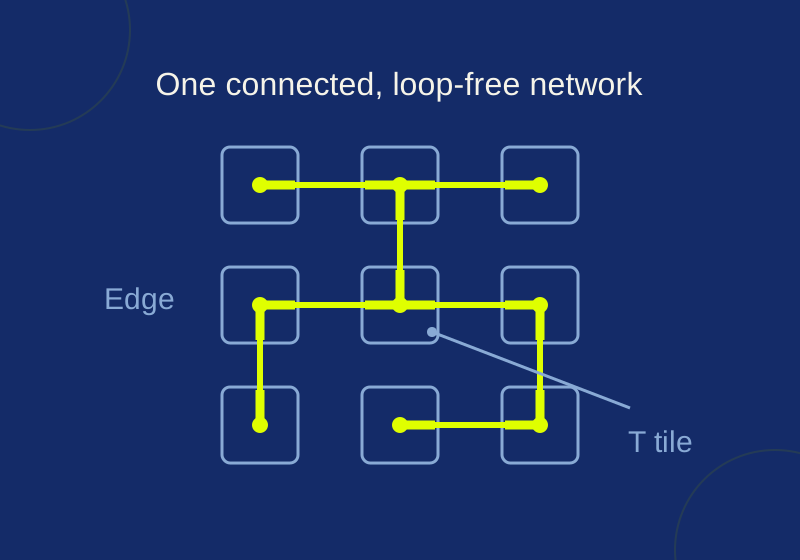
Open Simon Tatham’s Net in your browser and rotate its tiles until every tile joins one network with no closed loops. The middle tile is the starting point: tiles connected to it light up. The completed board connects every tile in one loop-free network.
Net is part of Simon Tatham’s collection of single-player puzzles. The browser game was opened without an account or payment in the recorded October 6 session. If you want a specific board to try, open the recorded 5×5 starting grid.
Read the connections first
Each tile has one or more branches that point toward neighboring tiles. A connection works only when both sides match: a branch pointing right must meet a branch pointing left on the tile beside it. Rotating just one side toward its neighbor is not enough.
The tile shapes also give you constraints before you click. An endpoint has one branch. An elbow’s two branches meet at a right angle; a T has three. On a standard, nonwrapping board, a branch pointing off the grid cannot connect to anything. At the top-left corner, for example, an endpoint’s useful directions are right and down. If it points right, check that the next tile points left toward it.
A lit group is a connected component: every tile in it currently has a path to the middle. Some rotations may still need to change to include the other tiles. Likewise, an isolated pair of endpoints can look neatly connected while leaving the rest of a larger board unreachable. A closed square made from four elbows is another trap: all four tiles connect around the ring, but their branches are used up, so the ring cannot join other tiles. On a board consisting of only two endpoint tiles, their pair could be the whole network; the problem on a larger board is the disconnected remainder.
Rotate, undo, and lock tiles
A left click rotates a tile anticlockwise; a right click rotates it clockwise. The official Net instructions also describe Shift-left-click or middle-click to lock and unlock a tile. Locking can help you keep a settled part of the layout in place while you work elsewhere. The documented keyboard controls are arrows to select, A for anticlockwise, D for clockwise, F for a half turn, and S to lock or unlock. Only mouse rotation and Undo were used in the recorded trial.
You do not need to judge a move by the lit-tile count alone. In the recorded 5×5 browser trial, an upper-left tile visibly rotated after a left click and Undo became available, yet the display remained at Active 8/25. The rotation happened; it simply did not add another tile to the middle tile’s connected group. Undo returned that move and made Redo available.
Work through a smaller network
The original 3×3 teaching start diagram gives you a compact puzzle to reason through before tackling the 5×5 board. It is a separate teaching example, not a screenshot or a solved run of the official game. The tiles are arranged like this:
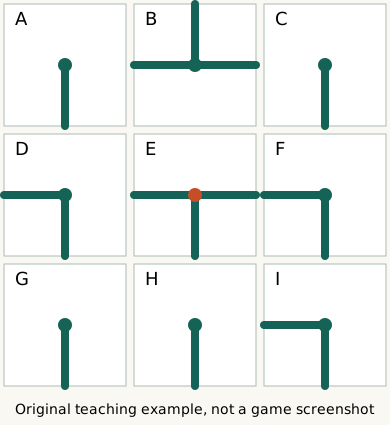
A  B  C
D  E  F
G  H  I
A, C, G, and H are endpoints. B and E are T tiles. D, F, and I are elbows. The start diagram deliberately shows shuffled directions; use the shapes and positions to find where their branches must end up. You can compare your reasoning with the answer diagram and teaching notes.
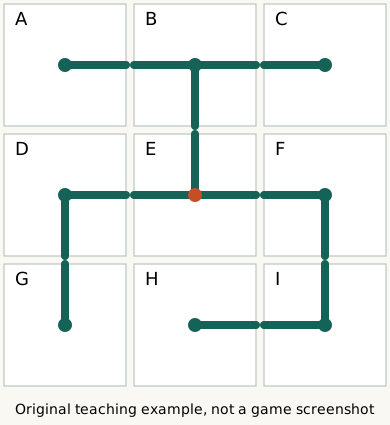
Start with B, the T in the top middle. A T uses three directions. Because this example does not wrap around the edges, B cannot send a branch upward off the board. Its three branches must therefore point left to A, right to C, and down to E. That settles both top-corner endpoints: A points right toward B, and C points left toward B. E must point up to meet B.
Now look at G, the endpoint in the bottom-left corner. Its possible inward directions are up toward D or right toward H. G cannot point right in a complete solution to this nine-tile board: H is also an endpoint, so connecting G and H would use both of their only branches and leave that two-tile pair separate from the other seven tiles. G must point up to D.
D is an elbow, with one branch pointing down to G. Its other branch must be perpendicular to that one. Left would leave the board, so D points right to E. E now needs branches up toward B and left toward D. We still have to determine its third branch.
Use the bottom-right corner next. I is an elbow, and its only inward directions are up toward F and left toward H. Both are required. H’s single branch therefore points right toward I, and F must point down toward I. F’s second elbow branch must be perpendicular to its downward one. Right would leave the board, so F points left toward E. That forces E’s final branch right toward F. E’s T now points up, left and right.
The finished connections are A-B, B-C, B-E, E-D, E-F, D-G, F-I, and I-H. Those eight connections join all nine tiles without a loop. An exhaustive check of this teaching board’s tile orientations found one connected, loop-free solution. Rotate each tile until it matches the directions in the answer diagram.
Apply the method to the 5×5 game
On the recorded 5×5 starting board, begin at an edge or corner and list the directions each tile can actually use. For a T along the top edge, all three branches must face into the available left, right, and down directions. For an endpoint in a corner, narrow its possibilities to the two inward directions, then inspect its neighbors before choosing one. Check both ends of each proposed connection and keep an eye out for a small group that would become isolated.
Use those deductions to settle a few tiles before working inward. The link identifies the starting grid; it does not preserve your intermediate rotations. The collection’s web-game information says the browser version has no save-game feature.
If you want to inspect a completed layout, the game has a Solve game control. In the recorded trial, clicking it changed the status to Auto-solved. The software solver supplied that layout. To keep solving by hand, use Undo or Restart game as described in the common instructions. The game also shows Restart game, which the common instructions describe as a way to return to the same board, and New game for another puzzle.
The edge deductions above assume the ordinary nonwrapping grid. Net also documents wrapping variants, where connections can cross from one edge to the opposite edge. On such a board, an outward-pointing edge branch needs different reasoning.
The October 6, 2026 Chrome trial checked one rotation, Undo and the software solver on the linked 5×5 board. Keyboard controls, Restart and New game follow the official instructions and were not tested. The separate original 3×3 teaching diagrams were rendered and exhaustively checked October 7. A manual solve of the official 5×5 game was not tested.
KEEP GOING
More to explore.
TESTEDFree digital life
Learn chess piece moves with free Lichess browser exercises
A bishop stays on f3 after the wrong straight move, then collects d5 and g8 with two diagonals. Tutorial stars also need careful interpretation.
TESTEDApps & the web
Make your first loop in Chrome Music Lab Song Maker
Set two bars and place C, E, G and E across sixteen time columns. A text recipe gives the exact squares.