SOURCE-CHECKED · BUSINESS DOCUMENTS
Box Governance vs Microsoft Purview: what happens when retained files are deleted
Understand Trash, Preservation Hold copies, competing expiry dates and legal holds in Box Governance and Microsoft Purview, with six worked file examples.
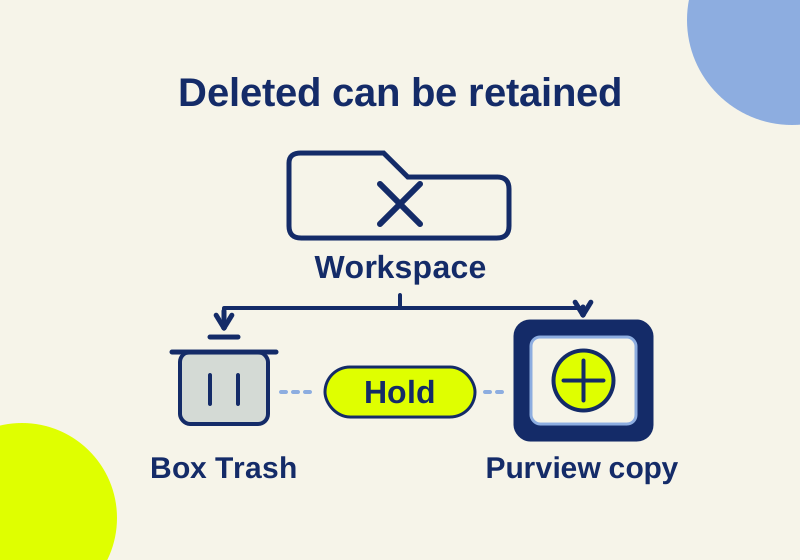
A file disappearing from its folder does not prove that its contents have been permanently deleted. Box Governance can keep a deleted file in Trash under retention; Microsoft Purview can preserve a deleted SharePoint or OneDrive file separately. The useful comparison is what survives, where it survives, and which event makes it eligible for disposal. Those answers also explain why an expired date can coexist with a file that still exists.
What each system preserves
| Situation | Box Governance | Microsoft Purview for SharePoint and OneDrive |
|---|---|---|
| A retained file is deleted | Trash can hold it; early permanent deletion is blocked. | A preservation copy can survive in the hidden Preservation Hold Library. |
| The retention period ends | Disposition is queued; an active hold can prevent permanent deletion. | Retain-only and retain-and-delete rules have different outcomes, with recycle-bin processing involved in deletion. |
| Someone makes a copy or changes the file | Moving and copying need separate evaluation. | Policy-based preservation differs from a standard non-record retention label. |
Box retention can target folders, classifications, metadata or all new content. All-new-content coverage is not retroactive. Governance is included in Enterprise Plus and Advanced or offered as an add-on on other business plans. Box applies retention to file versions. These are documented capabilities, not evidence that your account has them configured. Box retention policies
Purview policies generally cover locations, while labels apply to items; supported list items require labels. A policy can preserve content on edits or deletions, subject to Microsoft’s first-edit and versioning conditions. A standard non-record label preserves on deletion, but an edit alone does not create a Preservation Hold Library copy. That library is system-managed rather than a folder to maintain manually. Purview preservation behavior
Under ordinary Purview rules, retention takes precedence over permanent deletion, and a held item cannot be permanently deleted by a retention policy or label. Microsoft’s exceptional priority-cleanup feature is outside that ordinary-rule summary. Neither product description establishes retention for content stored in the other platform. Purview retention principles
Six cases that expose a misleading “deleted” status
The six-row retention worksheet contains the following synthetic cases. Twelve months is an invented project rule for this exercise, not a recommended legal schedule.
R1: the end date arrives, but nobody deleted the file
An accepted contract has a twelve-month retain-only rule. Nobody edits or deletes the current file. Purview leaves that current file at its source after the period ends.
The project owner’s expectation was “this will disappear next October.” The written rule said “retain,” without a disposal instruction. Record those as two different requirements before changing anything. In a contract register, add separate columns for the retention end date and the approved disposal action. A blank disposal action should prompt a question, rather than an assumption that the software failed.
R2: a hold outlives the retention period
A Box file reaches its scheduled permanent-delete date while an active legal hold applies. The hold prevents permanent deletion. Box hold populations can concern folders, files or versions through the API, or custodians; end users do not receive a legal-hold badge. Box legal holds
The useful question is “which hold includes this file?” A familiar employee name on a project list does not demonstrate the complete held population. Ask the authorized hold administrator for the scope and the responsible record owner. Keep that response separate from the ordinary disposal approval. Closing a project and closing a hold are separate administrative events.
R3: two retention clocks point to different dates
The worksheet gives one Box policy an October 7, 2026 expiry and another an October 7, 2028 expiry. The later applicable expiry controls. Disposal can take additional time; Box describes queued processing, including cases taking up to 72 hours.
Write the actual dates side by side. A “two-year” rule starting earlier can end before a “one-year” rule starting later. For a hypothetical acceptance on October 7, 2025, a twelve-month clock ends in 2026; a later applicable rule ending in 2028 still matters. Keep the start event next to each calculated date so another person can reproduce the result.
R4: copying creates a second item to account for
The original retained Box file is copied into a folder without applicable retention. The original folder policy does not retain that destination copy. A move has a different outcome: folder-based retention stays with the moved file.
Your inventory therefore needs two entries: the original path and the copy’s path. Include why the copy exists and who is responsible for it. An analyst’s downloaded reference, a project handoff copy and an official record can serve different purposes even when their filenames match. Looking only at the original leaves the copied item unanswered; treating both as the same record hides that gap.
R5: editing does not mean the same preservation event
The Purview example uses a standard label that does not mark the file as a record. An edit alone does not create a preservation copy; deletion does. Check version history separately.
Suppose the question is “can we recover the wording before Tuesday’s edit?” Write down the required version and timestamp. The presence of a retention label does not answer that recovery question by itself. Ask for the evidence of that particular revision rather than a screenshot showing only the label name. A retention decision and a recoverability decision need different evidence.
R6: Trash still contains a retained version
A Box file is in Trash before its retention period ends, so early purge is blocked. The worksheet calls the item deleted because it has left its working folder; it does not call it permanently removed.
In a closeout report, use separate statuses for removed from workspace, retained pending disposal, and disposal confirmed. That lets a project manager close delivery while the record owner continues managing retention. Do not mark the last status merely because a user cannot find the file through the usual folder view.
Turn the cases into a usable record instruction
Here is a completed, hypothetical instruction to discuss with the record owner:
Accepted project contracts; twelve months from acceptance; record owner approves disposition; an applicable incident hold suspends disposal.
It still needs an acceptance date, an accountable owner and a mapping to the product’s supported configuration. It does not establish a lawful period or promise that every license supports that trigger. Attach one sample contract to the discussion and fill in its actual acceptance event, current location, relevant versions and copies. Those concrete entries are more useful than a policy called “Contract retention” with no explained clock.
For a future evaluation, use disposable files in an authorized, already configured test environment. Record the initial rule and location before each action. The four proposed files are: a Box item moved to Trash without a purge attempt; a Box item copied to an unretained destination; a Purview standard-labeled item edited once; and an untouched Purview retain-only item followed through its end date. Compare each with R6, R4, R5 and R1 respectively. Expiry cases require observing the actual period and processing time, so a same-day check cannot demonstrate them.
This article uses official documentation checked October 7, 2026 and an authored worksheet. No tenant retention or deletion trial was performed.
KEEP GOING
More to explore.
SOURCE-CHECKEDBusiness documents
Google Vault vs Microsoft Purview: what happens to a deleted team file?
Follow a deleted file through retention clocks, holds, and cleanup, with the license differences that change what you can enforce.
SOURCE-CHECKEDBusiness documents
Bynder vs Box: what happens when an image license expires?
Compare scheduled asset archiving, Box link expiry and collaborator access with a complete licensed-photo record and withdrawal example.