SOURCE-CHECKED · IMAGE WORKFLOWS
Can you crop a CC BY-SA image? A real before-and-after example
Compare a real CC BY-SA 4.0 photo and crop, download both with complete credits, and understand what ShareAlike covers on a website.
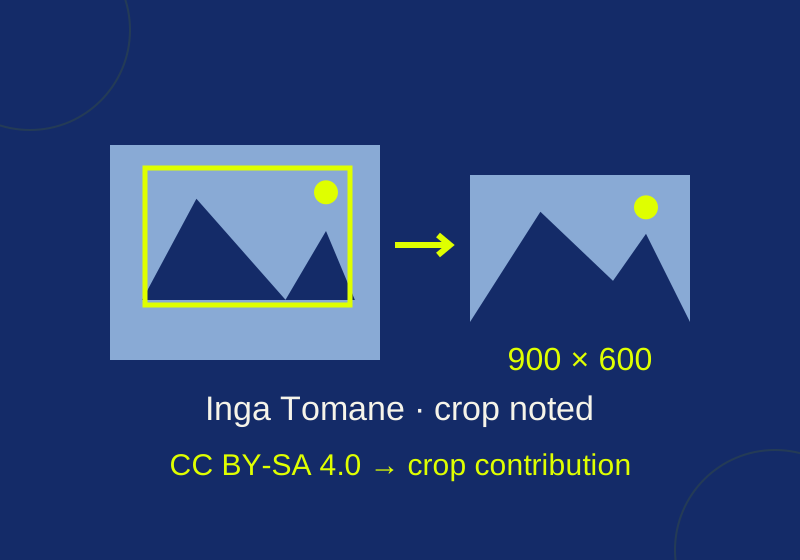
Yes. CC BY-SA 4.0 permits you to share and adapt a licensed photo, including for a commercial website, as long as you follow its conditions. For a crop, identify the creator and source, link the license and say what you changed. If the crop is an adaptation, ShareAlike also applies to the contribution you distribute. The license does not, by itself, require you to license your entire website the same way. Creative Commons summarizes the permissions and conditions here.
See the crop
This example uses “Lake Lucerne 2017(1) 01.jpg” by Inga Tomane. Its Wikimedia Commons file page identifies it as the creator’s own work under CC BY-SA 4.0. The source photograph measures 5,152 × 3,864 pixels.

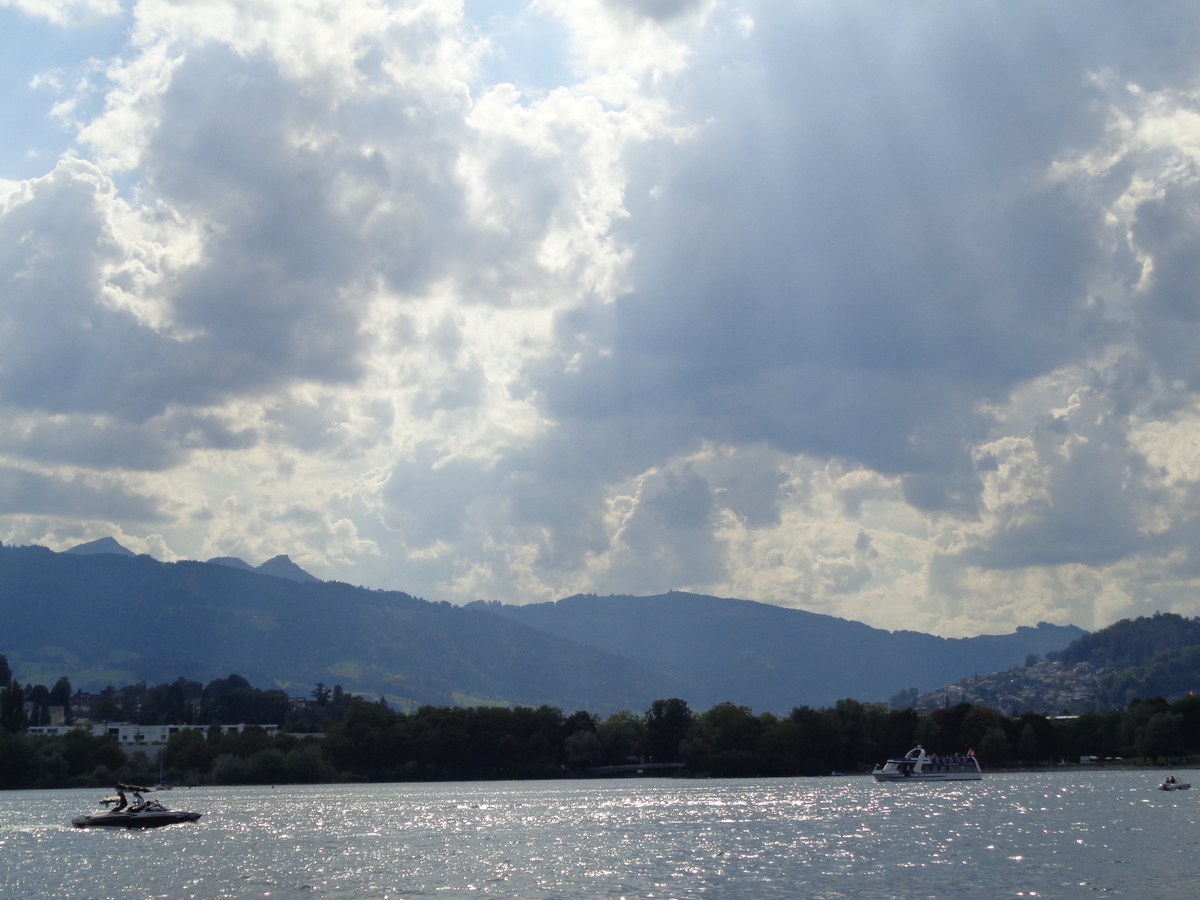
Before: A 1,200 × 900 display copy of Inga Tomane’s photograph, licensed CC BY-SA 4.0. It was resized and recompressed from the source. Original metadata was removed, and rights metadata was added. Download the display copy or read its credit and license notice.
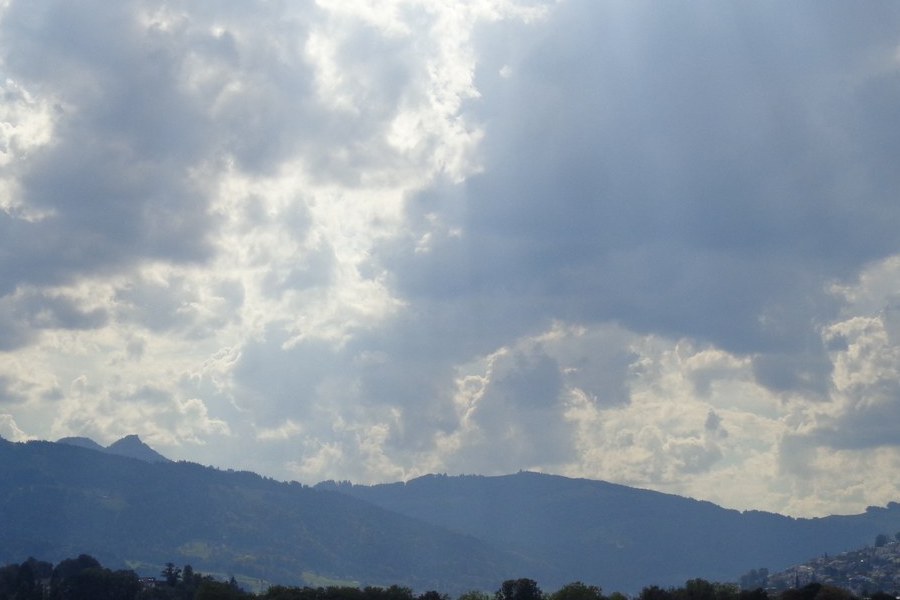
After: A 900 × 600 crop of the display copy of Inga Tomane’s photograph, originally licensed CC BY-SA 4.0. HowCurio made the crop and offers its contribution to it under CC BY-SA 4.0. Download the crop or read its credit and license notice.
The crop was cut from the 1,200 × 900 display copy, starting 150 pixels from its left edge and 120 pixels from its top edge. The extracted rectangle is 900 × 600 pixels. Those coordinates do not refer to the 5,152 × 3,864 source file.
The rectangle ends at x = 1,050 and y = 720. It removes 150 pixels from each side, 120 from the top and 180 from the bottom of the display copy. You can compare those boundaries with the full image before choosing a crop for your own layout. Starting from the larger source file with the same unscaled coordinates would produce a different composition.
The full display copy is 4:3; the crop is 3:2. It removes the lake water and boats at the bottom, shifting the picture’s emphasis toward the clouds and mountain ridges. That visible change is why “cropped” belongs in the credit, rather than describing the result only as a resized copy.
What ShareAlike covers
ShareAlike concerns the licensed work and material adapted from it. If you place this photo beside independently written article text, the photo’s license does not automatically relicense the text, theme, or entire website. Creative Commons distinguishes adaptations from collections of separate works; a more integrated composite, such as an artwork built from the photo and other elements, needs to be assessed on its own terms.
Whether a particular crop legally counts as an adaptation depends on applicable copyright law. Creative Commons says that mere technical modifications do not, by themselves, create an adaptation. This example makes the licensing choice clear without needing to settle that classification: to the extent HowCurio holds copyright in its contribution to the crop, it offers that contribution under CC BY-SA 4.0, the same license as the source photo. The BY-SA 4.0 legal code also describes other permitted adapter-license routes, including certain later licenses with the same elements.
ShareAlike does not mean “noncommercial.” CC BY-SA 4.0 permits commercial use. It also does not generally require you to provide an editable photo project or a preferred source-file format. It does require attention to the license conditions, including the rule against imposing additional restrictions on recipients.
Credit you can use with this crop
Keep the credit visible near the image or otherwise easy for readers to find. For this specific cropped file, the following text identifies the creator, source, license, changes, and crop license:
“Lake Lucerne 2017(1) 01.jpg” by Inga Tomane, source photograph, licensed CC BY-SA 4.0. HowCurio resized and recompressed a display copy, then cropped it to 900 × 600 pixels and recompressed it. The original metadata was removed and rights metadata was added. To the extent copyrightable, HowCurio’s contribution to the crop is also licensed CC BY-SA 4.0.
Credit the creator identified on the file page, rather than assuming that a file uploader created the image. Check the license on the exact file you intend to use, and retain any applicable copyright or license notices when passing it on. Creative Commons’ attribution guidance explains the source, license, and change information to include.
Keep the image license separate from the page footer
If your site has a general copyright footer, make the exception for the photo readable. For example, an independently written article could include this notice below the image: “Article text has its own copyright notice. The photograph and the cropped image are available under CC BY-SA 4.0 as credited above.” That is an example of a page notice, not a claim that every combined work is a collection. A poster or collage that integrates the photo into a new visual work can raise a different adaptation question.
A reader downloading the crop should receive the same creator and source credit, the change indication and the license link. Do not describe that file as your exclusive photograph or attach a new blanket prohibition on reuse to it. An accurate credit can still say that you made the crop without claiming you took the original photo.
The example JPEGs contain newly added rights metadata, and each has a readable .license.txt companion linked above. A caption is still useful on the page: a reader should not need a metadata viewer to find the credit. If you distribute the crop separately, carry its attribution and ShareAlike notice with that copy. If an upload platform’s terms would add restrictions incompatible with the license, obtain separate permission or choose another image.
The linked primary guidance and exact Commons file page were checked October 7, 2026. The displayed JPEGs were resized and cropped, then opened and checked for pixel dimensions and embedded credit. These results cover the image files, not a Photos or Preview interface test.
KEEP GOING
More to explore.
SOURCE-CHECKEDImage workflows
Can you use a CC NonCommercial photo on a blog with ads?
A real photo with conflicting notices explains why free downloads and attribution do not settle permission for an ad-supported blog.
TESTEDImage workflows
Responsive images with srcset: a working example you can download
Download three real image sizes and inspect which file a browser selects at mobile and desktop widths.