TESTED · FREE DIGITAL LIFE
Free Google Fonts: download Lora and check it before your next design
Download Lora from Google Fonts, compare real font files in an editable proof sheet, and check names, numbers, styles and license terms.
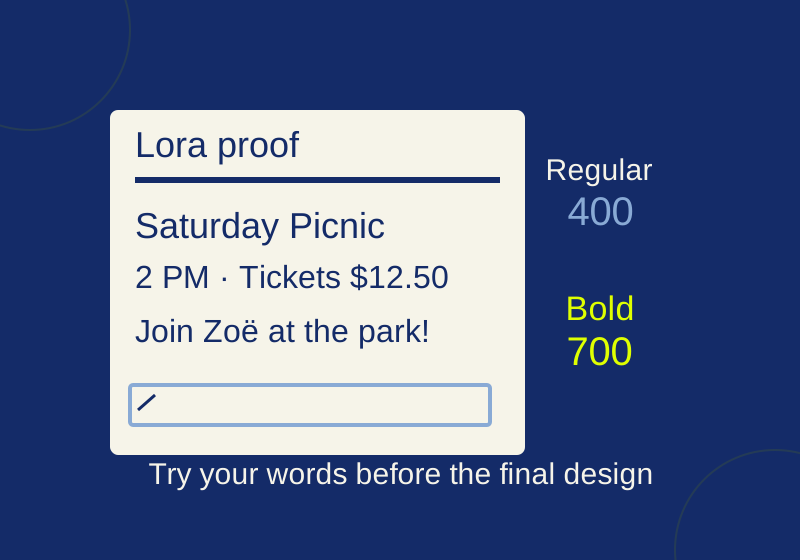
You can download Lora from Google Fonts, then check your own words in a Lora specimen worksheet before using it on an invitation, poster, or slide. Google Fonts says its fonts are open source and available without cost. Each family has its own license, so check the one supplied with the font when the project will be shared or sold.
Lora is a serif family designed by Cyreal. Its specimen page shows Regular 400 through Bold 700 with italics. Preview your text at the sizes you intend to use before choosing a style.
Download Lora
Open the Lora specimen page and look through its styles. The page offers language and writing system controls, along with a Get font button. In a download recorded on October 2, 2026, selecting that button led to a screen showing “1 font family selected,” with Download all (1) and Get embed code options. The download produced a Lora.zip archive.
Choose the download for a project that needs font files. The embed-code option is a separate route for website use. No signup or payment prompt appeared in the October 2 download session.
Pick a file from the ZIP
The inspected archive contains OFL.txt, README.txt, two variable font files, Lora-VariableFont_wght.ttf and Lora-Italic-VariableFont_wght.ttf, and eight static font files. The static set includes static/Lora-Regular.ttf and static/Lora-Bold.ttf.
A static font supplies a fixed style, such as Regular or Bold. The archive’s README says the variable font has a wght axis for intermediate weights, while support for those weights depends on the application. If you need a regular paragraph and a bold headline, the two named static files are clear files to start with. If you need an in-between weight, check whether your intended application supports the variable font.
Downloading the ZIP does not install a font in a design application. Keep track of the file and style you select there: seeing Lora in a browser worksheet does not establish that another application has loaded the same file.
Check real text in the specimen worksheet
The Lora specimen worksheet is set up with the unmodified Regular 400 and Bold 700 static files from the October 2 archive. It provides editable multiline text at 40, 20, and 14 CSS pixels, so you can inspect the same wording at three browser sizes. The full license is included with it.
Start with the words that must appear in the finished piece. A short sample such as “The quick brown fox” will not reveal whether a long venue name breaks awkwardly, whether a price is easy to read beside a time, or whether a name with an accent appears as expected. Use the preview to judge the words and layout in your own project.
Those size labels are CSS pixels in a browser. They are not physical print measurements. The worksheet’s Print this sheet button opens browser printing. It also uses Regular and Bold, so it does not demonstrate how Lora Italic renders.
Work through one invitation
For a picnic invitation, put the actual copy into the preview:
Saturday Picnic, 2 PM
Join Zoë at the park!
Tickets $12.50
Willow Creek Community Garden
At the large size, try Saturday Picnic, 2 PM as the bold headline. Check whether the comma and time feel crowded and where the line breaks at your intended width. At the smaller sizes, compare the date, ticket price, and full venue name in Regular. A location that fits on a wide worksheet may wrap on a narrow invitation, so test the width of the design you mean to make.
Include the names, accents, symbols, and punctuation your project needs. A character can appear on screen because a browser substituted a glyph from another font, so its mere appearance does not prove that your selected font supplied it. Check the text in the application and output you will actually use.
For close letter and number pairs, add a short line such as I l 1 / O 0. The point is to see whether you can distinguish the capital I, lowercase l, numeral 1, capital O, and zero at the size where they matter. On this invitation, that might be the small ticket price or time, rather than the headline.
Then add a paragraph to expose line breaks that the four short lines cannot:
On Saturday, bring a blanket to Willow Creek Community Garden for an afternoon picnic. Meet beside the north gate at 2 PM. Zoë will have lemonade and a few extra cups. If the forecast changes, check the invitation for an updated meeting spot.
This is fictional invitation copy you can replace with your own details. Compare where its lines end at 20 and 14 CSS pixels. If the small version feels cramped or the venue becomes hard to find, revise the layout or wording and inspect it again. Keeping one family while you do this makes it easier to see what changed.
If the font differs in another app
First check whether the application is using Lora at all, then check the selected style and file. The worksheet uses static Regular and Bold. An application using a variable file, another style, or a substitute font may show different results. The archive’s README specifically cautions that support for intermediate variable weights depends on the application.
Check the license when sharing
Lora’s SIL Open Font License 1.1 permits use, embedding, and redistribution subject to its terms. The font software cannot be sold by itself; distribution of the font software requires the notice and license, and the reserved name Lora matters for modified font software. The license’s requirements for font software do not apply to documents created using the font. Google Fonts’ FAQ also says commercial use, including commercial products and logos, is allowed under each font’s license. Other Google Fonts families may use different licenses, including Apache or Ubuntu licenses.
An exported image shows the appearance of your design; an editable project that still needs font files is a different handoff. If someone else must edit the text, tell them which family and styles you used and provide the relevant license when sharing font files. For further type-selection guidance, Google Fonts has a typography learning portal; the Open Font License site provides license background.
The Lora download and archive were checked October 2, 2026. On October 7, the new proof sheet loaded both font files in Chrome at 320 and 1440 pixels, and editing the text updated all three specimen sizes. Its license was checked against the official text. Installation in a design application, finished output and physical printing were not tested.
KEEP GOING
More to explore.
SOURCE-CHECKEDFree digital life
Find free LibriVox audiobooks and choose a narrator before downloading the whole book
The same classic can have a solo narrator, changing chapter readers or a dramatic cast.
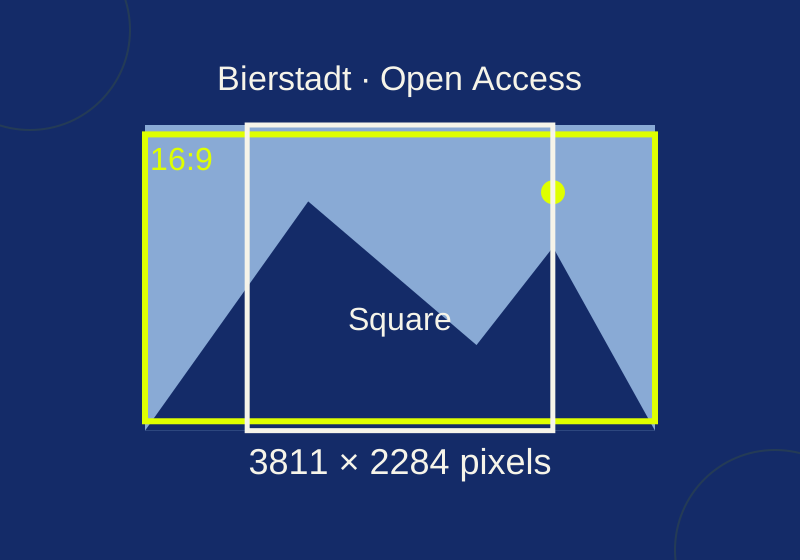
TESTEDFree digital life
How to download free art from The Met and size it for a real project
Start with a verified Bierstadt JPEG, then work out which pixels a slide or square crop would remove.