SOURCE-CHECKED · BUSINESS DOCUMENTS
Microsoft 365 Business Standard vs Premium: what changes for security?
Compare Standard and Premium security, current US prices, device compliance, personal-phone app protection, and what report-only policies actually do.
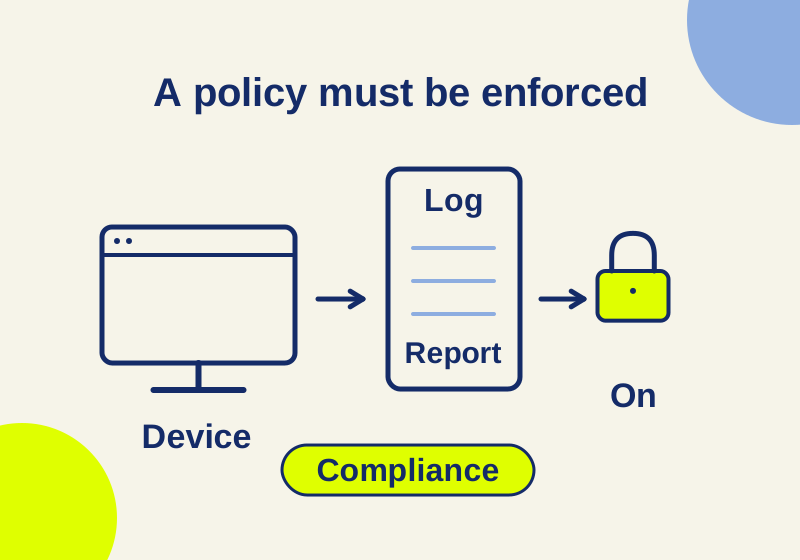
Microsoft 365 Business Standard already includes the Office apps and cloud services for editing and sharing client documents. Business Premium adds controls for who can sign in, which devices can reach work resources, and how supported apps handle company data. It also includes additional email and endpoint protection. Choose Premium when you need those controls and have someone to configure them. The upgrade does not create a working access policy by itself. Microsoft’s business security overview
For example, a client-file rule might require a compliant device before staff can open or sync the files. Premium includes Entra ID P1 for Conditional Access and Intune Plan 1 for device management. Standard’s base subscription doesn’t include those entitlements. The rule still needs a defined user group, device compliance requirements, and the resources it will cover. Conditional Access overview
The Office apps aren’t the reason to upgrade
Standard includes desktop, web, and mobile Word, Excel, PowerPoint, and Outlook, plus 1 TB of cloud storage per user. Premium retains the core apps and services. A team that needs to coauthor a proposal or share a workbook already has those tools in Standard. Business Standard · Business plans
| Included security capability | Business Standard | Business Premium |
|---|---|---|
| Identity | Entra ID Free | Entra ID P1, including Conditional Access |
| Email protection | Built-in mailbox protection | Built-in protection plus Defender for Office 365 Plan 1 |
| Device management | Basic Mobility and Security | Intune Plan 1 |
| Endpoint protection | Defender for Business isn’t in the base bundle | Defender for Business |
Email protection and endpoint protection cover different problems. A suspicious attachment arriving in a mailbox is a different event from malware executing on a laptop. Premium includes products for both, and their settings need review. Microsoft’s security entitlement table
Entra ID P1 supports Conditional Access, but sign-in-risk and user-risk policies require Entra ID P2. Buying Premium doesn’t include every feature shown in Microsoft’s broader security catalog. Products used alongside an access policy can have separate licensing requirements. Conditional Access licensing
A usable example: require a compliant device
Use a small group of appropriately licensed pilot users and a non-sensitive work document. Decide which Microsoft 365 resources they should reach from a compliant device. This example is a proposed configuration; no live tenant policy was configured or tested for this article.
Before creating the access rule, the administrator needs an Intune compliance policy and at least one device already marked compliant. In the Entra admin center, an account with at least the Conditional Access Administrator role can go to Entra ID > Conditional Access > Policies > New policy. Microsoft’s compliant-device procedure
Under Assignments > Users or workload identities > Include, choose the pilot group. Set Target resources to the Microsoft 365 resources the pilot is meant to cover. Exclude emergency access accounts and directory synchronization roles where applicable. Microsoft’s published example uses all users and all resources; this narrower pilot is an adaptation. Policy assignments
Under Access controls > Grant, select Require device to be marked as compliant. Set Enable policy to Report-only and create it. After checking the impact, the administrator can move the policy to On for the pilot. Grant and policy state
The target-resource assignment sets the access-policy scope. It doesn’t give someone permission to a particular client folder. Keep the resource policy and the folder’s permissions as separate records: which users may reach the service, and which of them may open the document once there.
A short pilot record makes it possible to interpret a later sign-in without reconstructing the configuration:
Requirement: A pilot user needs a compliant device for the selected work resource.
Included group: [your pilot group]
Target resources: [the selected Microsoft 365 resources]
Excluded accounts or roles: [your actual exclusions]
Intune compliance policy: [the policy assigned to the device]
Grant: Require device to be marked as compliant
Initial policy state: Report-only
Actual sign-in time, resource, device state and policy result: [fill after the sign-in]
These are blanks for the administrator’s own record, not sample observations. Conditional Access evaluates a resource request using the assigned users and conditions, so the record needs the actual resource and account involved. How Conditional Access evaluates requests
An OR setting can defeat the device requirement
For compulsory MFA and compliance, select both controls and Require all the selected controls. Require one of the selected controls permits MFA without compliance. Microsoft defaults to requiring all, but the administrator can change that operator. Grant controls
Compliant is a policy state, not device ownership. A company-owned-only rule needs that separate requirement in the access design. On Windows, Edge InPrivate is considered noncompliant for this grant control. Compare the browser modes people will actually use. Device compliance grant
A successful sync in report-only is expected
Report-only evaluates a policy without enforcing its grant or session controls. Open a sign-in’s Conditional Access and Report-only details to see whether the new rule applied:
- Report-only: Success means the conditions and required controls were satisfied.
- Report-only: Failure means the conditions matched but required controls weren’t satisfied.
- Report-only: Not applied means the conditions didn’t match, for example because the user was excluded.
- Report-only: User action required means an interactive action would be needed, without prompting the user to complete that control.
One policy’s Success doesn’t rule out another policy blocking the request. Report-only compliance checks can also prompt macOS, iOS, or Android users to select a device certificate, so the pilot isn’t necessarily invisible to them. Report-only results and certificate prompts
A noncompliant laptop syncing successfully during report-only doesn’t demonstrate a broken policy: the rule isn’t enforcing its device requirement yet. A Not applied result also doesn’t demonstrate that the device passed. It tells the administrator to check whether the intended user and resource were actually in scope.
For OneDrive, an already authenticated session can make an immediate comparison misleading. Microsoft documents that a new policy created after authentication can take up to 24 hours to take effect. Inspect an actual relevant sign-in and the applied policy instead of treating a continuing sync session as an enforcement test. OneDrive sync and Conditional Access
Existing downloaded copies need their own handling plan. A log showing that a future access request was blocked isn’t evidence that an earlier local copy was deleted. Ask for the specific file or managed-app removal mechanism if deletion is part of the requirement.
Personal phones need an app-specific plan
Intune app protection can manage work data inside supported apps without enrolling the whole phone in mobile device management. Settings can require a work-app PIN, restrict copying work data to personal apps, or prevent saving it to personal storage. Policies apply in the work context; this isn’t management of all the owner’s personal data. Intune app protection
The mobile Require app protection policy grant needs Entra registration and a broker: Authenticator on iOS or Company Portal on Android. It’s generally available for those platforms; the Windows Edge route is preview. Device-enrollment exemptions don’t remove these identity requirements or extend protection to every app. App-protection grant requirements
For a new policy, use Require app protection policy. Microsoft’s grant documentation lists the older Approved client app control for retirement in early March 2026. Current grant guidance
Assign the Intune entitlement to the user and target the intended app and security group. Pair app protection with a suitable access policy when users must take the protected-app path. App-protection policy scope
Keep existing sign-in protection during the migration
Standard has access to free security defaults. They provide an on-or-off baseline without the group-specific customization of Conditional Access. If the tenant uses them, replacing them is a separate migration from creating a device pilot. Microsoft instructs administrators to disable security defaults when implementing replacement Conditional Access policies and immediately enable equivalent protection. A report-only device policy doesn’t replace enforced MFA. Moving from security defaults
What the license and label don’t establish
Microsoft allows Premium deployment to part of an organization. Its management and security benefits need the appropriate users and devices covered by that subscription. One Premium administrator seat doesn’t license the rest of a Standard-only workforce for Premium controls. Match the proposed policy’s users to their entitlements. Premium licensing FAQ
The business-family limit is 300 total provisioned licenses in a tenant. Microsoft’s example says 250 Premium seats leave room for only 50 more across that family. An organization near that size should compare enterprise offerings instead of stacking Business subscriptions past the limit. Business-plan limits
Premium includes information-protection capabilities such as sensitivity labels, Purview DLP, and Message Encryption. A particular advanced feature still needs its own entitlement check; a portal showing the Purview name doesn’t establish access to its whole catalog. Premium information protection
A label named Confidential can have encryption settings, markings, or no protection settings at all. Inspect what the administrator configured and who can use the file. Sensitivity labels and retention labels serve different purposes, and a document can have both. The word Confidential doesn’t supply a deletion date. What sensitivity labels can do
Compare the same subscription variant
On October 7, 2026, Microsoft’s US pages advertised the base with-Teams plans at $14 for Standard and $22 for Premium per user per month, paid yearly on an annual subscription. That is an $8 difference per user per month equivalent. For a hypothetical 12 seats on the same plan, the difference is $96 per month equivalent or $1,152 per year. These are subscription calculations; they exclude any setup or support work. Business Standard · Business Premium
Match Teams, Copilot, payment cadence, and contract term before comparing a quote. Microsoft lists no-Teams variants and Copilot bundles separately; they aren’t interchangeable prices for the same upgrade. Check the current offer for your region and reseller before purchasing. Current plan variants
Official Microsoft pages were checked October 7, 2026. The access-policy example is documented guidance, not an observed tenant result.
KEEP GOING
More to explore.
SOURCE-CHECKEDBusiness documents
Microsoft 365 Business Basic vs Standard: when desktop Office is worth paying for
Basic covers browser Office work. Standard adds installed apps for mail merge, VBA, file comparison, and offline editing.
SOURCE-CHECKEDBusiness documents
Notion vs SharePoint for policies: keep drafts out of the handbook
Keep draft policy changes separate from employee guidance with a worked approval lifecycle, SharePoint version settings, and Notion access boundaries.