SOURCE-CHECKED · BUSINESS DOCUMENTS
How to audit external Box collaborators when a project ends
Find external Box invitations across a completed project, distinguish parent access from file invites, and work through downloadable CSV examples.
The agency has delivered the final files, but its invitation to the project folder dates from last year. Searching only this month’s invitations would miss it. A Box closeout audit should cover the whole project tree and keep each collaboration separate: one person can have more than one invitation, and an invitation to a parent folder can matter after a direct invitation to a child folder is removed.
The practical starting point is a Collaborations report run by your Box administrator. Use it to identify outside collaborators and the items associated with their invitations. Then confirm the current state and where each invitation originated before deciding what to change. A separate Shared Links report covers links; it does not turn a link into a named collaborator.
Run the project report
Ask a Primary Admin, or a Co-admin with Run new reports and access existing reports permission, to open Admin Console > Reports > Create Report > Collaborations > Next, configure the report, and select Run. Reporting availability depends on the tenant, so confirm that the report is available rather than assuming a particular plan includes it. Running Reports and Co-admin report permissions describe the route and role requirements.
For one completed project, select its owning folder and include subfolders. Filter Collaborator Type to External Users. Include columns that let you identify both the person and the grant: Collaboration ID, item and path identifiers, path and item name, collaborator login and permission, inviter, invited and accepted dates, and expiration. Keep the owner fields if several owners’ content could appear in the result. Box’s Collaborations Report guide describes these fields and filters.
Leave the invitation date range unselected when the question is “Who was invited anywhere in this project?” Box calls that All Time, subject to its reporting history of up to seven years or the period for which reporting access exists. A recent date filter answers a narrower question. In the worked example below, a September 2026 filter finds Casey’s file invitation but misses both of Alex’s 2025 invitations and Taylor’s February 2026 invitation.
Reports can take minutes to generate, sometimes up to 12 hours, with large reports taking longer. Box advises contacting support if one remains pending after 24 hours. Content-report data can lag the run by up to 24 hours, and exports exceeding one million rows are split into files marked _Page_#. Those timing and file details matter when you compare a closeout report with a change made the same day. Running Reports.
Count invitations and people separately
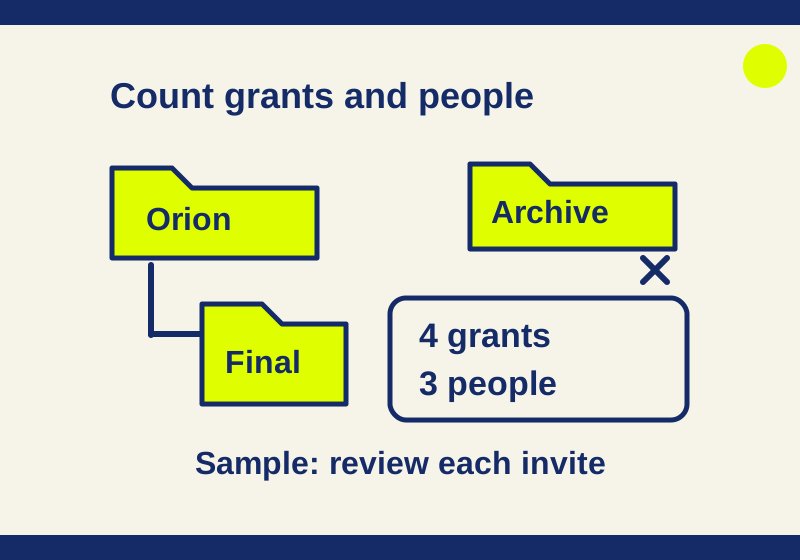
The practice Collaborations CSV is a synthetic teaching file, not an export from a Box tenant. Its six invented rows make the counting problem concrete. The project root is /Clients/Orion.
Keep an untouched copy of the CSV and do the review in a separate worksheet. Import identifier columns as text so opaque IDs remain intact. Filter paths to exactly /Clients/Orion or paths beginning /Clients/Orion/. The slash after the root matters: /Clients/Orion-Archive is a sibling, not part of the project. Then retain the external collaborator rows. In this sample, that excludes row 7104 in the archive and row 7105 for the internal user.
For the downloadable file, Path is column D and Collaborator Type is column K. In a new helper column, enter this Excel formula on the first data row and fill it down:
=AND(OR(D2="/Clients/Orion",LEFT(D2,LEN("/Clients/Orion/"))="/Clients/Orion/"),K2="External")Filter that helper column to TRUE. The two path conditions include the project root and its descendants; they exclude the similarly named archive folder. If you rearrange columns or use a different export, substitute your actual Path and Collaborator Type cells. The formula uses English function names and comma separators.
The result is four project collaboration rows for three distinct outside people:
| Collaboration | Outside collaborator | Project item | Invitation and closeout question |
|---|---|---|---|
| 7101 | Alex, alex@agency.example |
/Clients/Orion |
Parent folder Editor invitation, November 2, 2025. Ask whether the owner has accepted delivery and the parent collaboration can end. |
| 7102 | Alex, alex@agency.example |
/Clients/Orion/Final |
Earlier Co-owner invitation, September 1, 2025. Review it separately from the later parent Editor invitation, 7101. |
| 7103 | Casey, casey@agency.example |
/Clients/Orion/Final/proof.pdf |
Viewer invitation, September 20, 2026. Accepted date and inviter are blank; check its state on the item. Listed expiration: October 31. |
| 7106 | Taylor, taylor@counsel.example |
/Clients/Orion/Briefs |
Viewer invitation accepted February 2, 2026. Ask whether counsel still needs the exception through its listed October 15 expiration. |
The sample’s filter and arithmetic were checked locally: six input rows become four external collaboration rows within the exact project path, representing three collaborator logins. All names, addresses, and IDs in these files are invented.
Count distinct logins if you need a people count, but retain Collaboration ID as the unit of review. Deduplicating on email alone would collapse Alex’s two rows and hide the separate invitation to Final. Neither a four-row count nor a three-person count, by itself, says which access should end.
Find where access starts
A parent folder invitation is inherited below that folder. Box documents a particular sequence for a higher role on a child: invite the person to the child first, then invite them to the parent. Alex’s September 2025 Co-owner invitation to Final precedes the November 2025 Editor invitation to /Clients/Orion. Removing the direct Final grant alone leaves the parent route; removing only the parent grant does not account for the earlier direct grant. Review both origins before ending project access. Box’s item permissions guide
Do not try to manufacture this arrangement by adding a child invitation after the person already collaborates on its parent. Box says it does not add that collaboration, even though it can erroneously display a success message and email a notification. An invitation email alone is therefore insufficient evidence of a second grant. Check the actual collaboration record.
Have the administrator inspect the relevant item through Admin Console > Content > Content Manager > Users, choose the item, and open Manage Collaborators. The Added To information helps locate where a collaborator was added, including when access shown on a child item comes from a parent. Managing Collaborators of a User’s Files and Folders.
Treat blank cells as questions, not decisions. Casey’s empty accepted date does not establish that the invitation has been revoked or that access is disabled. Box also lists several reasons an inviter field may be blank, including a group invitation or a deleted inviter. Check the invitation on proof.pdf before recording a closeout outcome. The worked owner decisions CSV leaves all four rows Unresolved; it records questions for the owner, not removals performed in Box.
Check shared links on the same items
Run a Shared Links report for the relevant content owners, then match the project items by ID or the exact path boundary. Its documented filters include owners and link dates; it does not offer the Collaborations report’s folder-selection filter. Compare links with collaboration rows using Item ID while preserving the two reports as different kinds of records. A link row identifies a shared item and link settings; it does not identify every person who received the URL.
The synthetic shared-links CSV has three rows. Item 9003, proof.pdf, has an original Open status but a Derived Status of Collaborators. Item 9004, Briefs, remains Open in Derived Status even though Password Set is Yes. The archive item, 9010, falls outside the exact project path. Use Derived Status when assessing the reported link scope, then ask the owner who actually received each link. The password entry does not establish access without the password, and a link’s status does not establish its recipient list. Box’s Shared Links Report guide explains the status fields and notes a Permissions reporting issue for Invited people only links; an erroneous preview value there should not override the link’s actual recipient check.
Resolve gaps before closing the audit
If the report is empty, revisit its filters first. Also confirm that you ran Collaborations, rather than using a Folders or Files inventory as a substitute. If report generation fails because the CSV cannot be placed in the root Box Reports folder, ask the administrator to check whether Restrict Content Creation is blocking that upload. Box’s reports FAQ covers these cases.
Do not treat an absent row as proof that every invitation is gone. Box documents a case in which a pending collaborator affected by an exposed-password reset can be absent from the report during a grace period. Check the relevant item when its invitation state matters to the decision. Collaborations Report.
Record the owner’s decision against each Collaboration ID and the actual recipients considered for each link. After changes, run the same report scope and filters again, allowing for the documented data delay. Box reports use UTC for date values while the report filename uses the administrator’s local timezone, so compare timestamps on the same basis.
Source note: Box documentation linked above was checked October 7, 2026. The linked CSVs are synthetic, and their local filtering and counts were checked. No Box admin tenant, live export, or revocation was tested.
KEEP GOING
More to explore.
SOURCE-CHECKEDSharing workflows
Box or Google shared drives for an agency: keep the work when the project ends
Keep editable agency work in company-controlled storage. Compare Box folder inheritance, Google shared-drive ownership and the desktop role that can block uploads.
SOURCE-CHECKEDSharing workflows
Box vs SharePoint sharing reports: find the access a CSV misses
Read Box and SharePoint sharing CSVs without mistaking rows for people or missing links for no access. Download and reproduce a six-row worked audit.